Why Do Browser Translation Tools Break Some Websites?
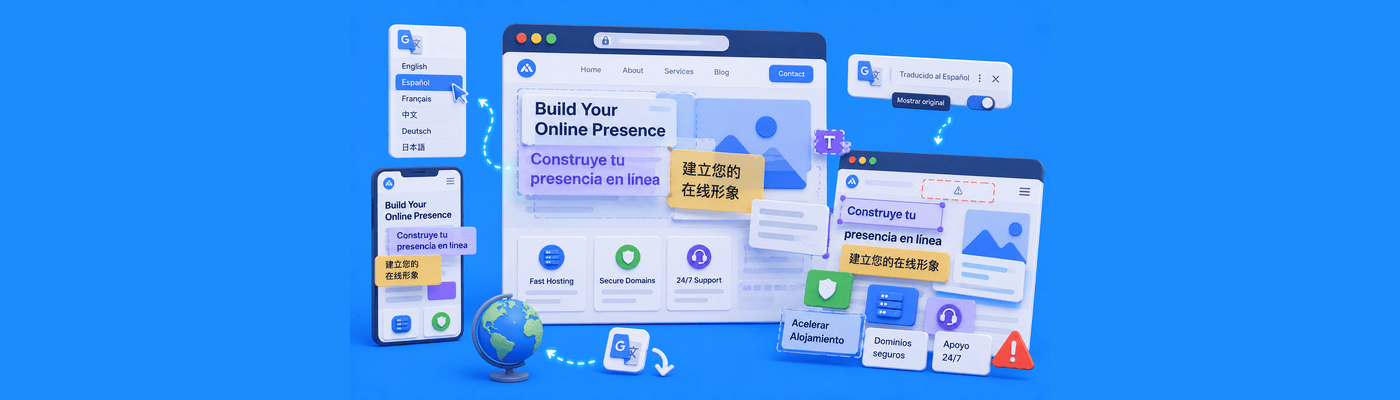
Browser translation tools sometimes break websites because modern translation systems do far more than simply replace words. Many of them actively rewrite webpage content while the site is already running. If a website depends heavily on JavaScript, dynamic layouts, interactive forms, or live interface components, the translation process can accidentally interfere with how those systems function underneath.
Why This Problem Feels So Inconsistent
One of the more confusing things about browser translation problems is that the website often looks completely normal at first.
Then suddenly, buttons stop responding, menus shift out of place, forms behave strangely, or sections of the page begin overlapping each other after translation activates.
Sometimes only certain parts of the site break. Other times the page reloads unexpectedly or interactive elements become unreliable without any obvious error message appearing.
What makes this especially frustrating is that the website owner may never experience the problem themselves. The site works perfectly in its original language, while visitors using browser translation tools encounter an entirely different experience.
That disconnect is why these issues are often mistaken for random browser glitches instead of translation-related behavior.
Modern Translation Tools Modify Websites in Real Time
A lot of people still imagine translation tools as simple overlays that swap one language for another. Modern browser translation systems are far more aggressive than that.
In many cases, the browser actively rewrites parts of the webpage while scripts, animations, menus, forms, and dynamic elements are already running.
To visitors, this process feels instant and seamless. Underneath, the browser may be restructuring large portions of the page dynamically.
That becomes risky on modern websites where:
- layouts constantly adjust themselves
- buttons trigger live scripts
- menus depend on dynamic positioning
- forms update in real time
- animations react to page structure
The translation system is no longer just displaying content differently. It is interacting directly with the webpage while the site is actively functioning.
Why Dynamic Websites Are More Vulnerable
Years ago, many websites were mostly static. Translation tools had fewer opportunities to interfere with functionality because the pages themselves were relatively simple.
Modern websites behave much more like applications now. A single page may contain:
- live search elements
- dynamic product filters
- animated menus
- real-time chat widgets
- interactive booking systems
- auto-updating forms
All of these systems often depend on very specific page structures and script behavior to function correctly.
When translation tools begin rewriting text, changing element sizes, or restructuring portions of the page dynamically, those underlying systems can become unstable surprisingly quickly.
That is why translation-related problems appear much more frequently on modern websites than older static pages.
Layout Problems Usually Start Small
One of the more subtle effects of browser translation is that translated text often changes the physical size of the interface itself.
Some languages naturally require more space than others. A short English phrase may become significantly longer after translation.
At first, the changes may seem harmless:
- buttons become slightly wider
- menus shift slightly
- text wraps unexpectedly
But modern responsive layouts often rely on tightly balanced spacing and positioning rules underneath.
A navigation bar that fits perfectly in one language may suddenly overlap itself in another. Buttons may shift outside visible containers. Dropdown menus may no longer align properly.
What users experience as a “broken website” is often the result of translation changing the structure of the layout itself in ways the original design never anticipated.
JavaScript Can Become Unstable After Translation
Some translation-related problems go deeper than visual layout changes. Many modern websites rely heavily on JavaScript frameworks that constantly track and manipulate page elements dynamically. Translation systems sometimes modify those same elements while the scripts are already running.
That creates situations where:
- buttons stop responding
- filters reset unexpectedly
- forms stop validating correctly
- menus close randomly
- search fields behave unpredictably
To users, the behavior feels random. Underneath, two different systems may be trying to manipulate the same webpage structure simultaneously.
This becomes especially noticeable on heavily interactive websites built with modern frontend frameworks.
Forms and Checkout Pages Are Especially Sensitive
One area where translation issues become particularly frustrating is during forms and checkout processes.
Modern forms often depend on:
- dynamic validation
- auto-formatting
- live error checking
- real-time field updates
Translation tools can sometimes interfere with how these systems interpret field labels, placeholder text, or validation behavior.
A translated checkout form may suddenly reject perfectly valid information. Booking systems may display mismatched instructions. Address fields may stop formatting correctly.
Because the visible website still appears functional, users often blame the website owner directly rather than realizing the translation layer itself introduced instability into the process.
Browser Updates Can Suddenly Trigger New Problems
Another reason these issues feel unpredictable is that browser translation systems constantly evolve in the background.
A website that worked perfectly with browser translation last month may begin behaving differently after:
- a browser update
- a translation engine update
- a privacy-policy change
- a rendering adjustment
Website owners sometimes spend hours troubleshooting their own code before realizing the visible changes originated from translation behavior inside the browser itself.
This creates a particularly frustrating situation because the website technically did not change at all.
Mobile Translation Creates Additional Complexity
Translation behavior on mobile devices can become even more unpredictable. Mobile browsers often combine:
- automatic translation
- responsive layouts
- aggressive memory management
- touch-based interface scaling
all at the same time.
A layout that survives translation correctly on desktop may collapse entirely on smaller screens once translated text expands buttons, menus, or navigation containers unexpectedly.
This is one reason multilingual layout issues frequently appear more severe on phones than desktop systems.
Why These Problems Feel More Common Today
Modern websites have become significantly more interactive, personalized, and script-driven than they were years ago.
At the same time, browser translation systems have become more aggressive about modifying content dynamically in real time.
Those two trends increasingly collide with one another.
The more dependent a website becomes on dynamic interface behavior, the more fragile it can become when an external system starts rewriting portions of the page structure while everything is already running.
That does not mean translation tools are bad. In many cases they are incredibly useful.
It simply means modern websites are no longer passive documents. They are active systems, and active systems tend to behave unpredictably when modified dynamically underneath.
Final Thoughts
When browser translation tools break websites, the issue is usually not caused by a single obvious bug. More often, it happens because modern translation systems actively modify webpages while dynamic scripts, layouts, and interface components are already running in the background.
As websites become more interactive and browsers become more aggressive about real-time translation and personalization, these conflicts are becoming increasingly common across the modern web.
That is why translated websites may sometimes behave differently, look unstable, or partially break even while the original version of the site continues functioning normally.
NameSilo provides reliable hosting infrastructure, SSL support, and website solutions designed to support modern web experiences across browsers, devices, and global audiences. Whether you are managing multilingual content, dynamic websites, or internationally accessible platforms, NameSilo provides the infrastructure foundation needed to help your website remain stable and accessible across different browsing environments.
NameSilo Staff
The NameSilo staff of writers worked together on this post. It was a combination of efforts from our passionate writers that produce content to educate and provide insights for all our readers.