Managing PHP Versions and Extensions in cPanel
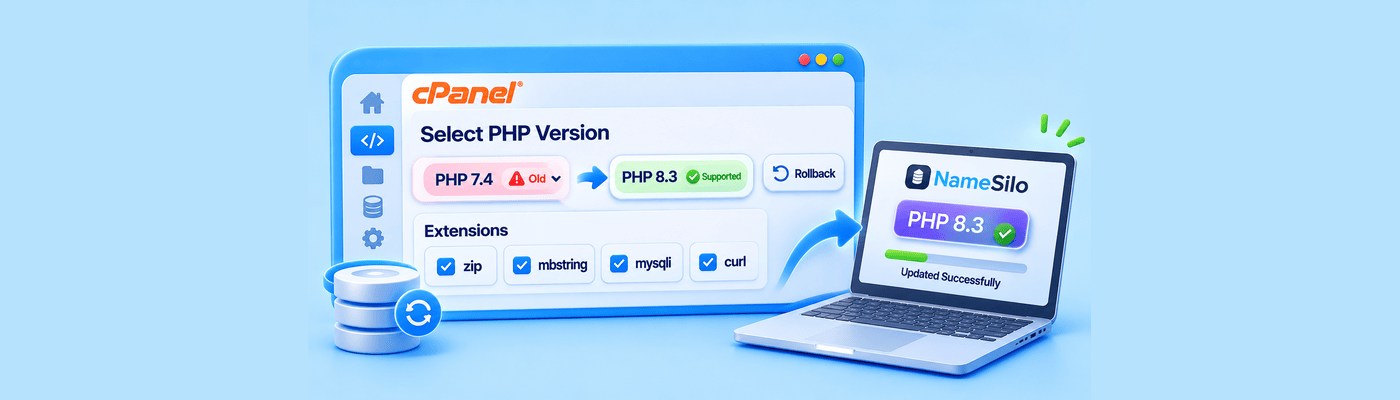
To manage PHP in cPanel, open Select PHP Version. Move off an end-of-life version to PHP 8.2, which our hosting supports, and apply it. Use the Extensions tab to enable missing modules like zip or mbstring. Back up and test first. If your site breaks, select the previous version to switch back.
What Is the PHP Runtime?
PHP is the engine that runs WordPress and most hosted web apps. Each PHP branch gets two years of active support, then two years of security-only fixes, then reaches end of life. Upgrades are routine.
PHP version | Status in October 2026 |
7.4, 8.0, 8.1 | End of life |
8.2 | Security fixes only, until Dec 31, 2026 |
8.3 | Security fixes only, until Dec 31, 2027 |
8.4, 8.5 | Actively supported |
Why It Matters: Speed and Security
An end-of-life version no longer receives security fixes. WordPress itself warns that old PHP versions "may expose your site to security vulnerabilities." Choose a currently supported PHP version available in your cPanel.
Upgrading the PHP Version
Run these checks first:
Back up your files and database.
Update WordPress, themes, and plugins.
Check each plugin and theme for PHP compatibility notes. Replace abandoned ones.
Test on a staging copy if you have one.
Pick a quiet hour for the change.
Then switch versions:
Log in to cPanel and open Select PHP Version in the Software section.
Choose a version from the Current PHP Version list.
Click Apply. The change takes effect immediately.
Load your homepage, a post, the admin area, and checkout. Review the error log.
Enabling Missing Extensions
If a plugin reports a missing module, open the Extensions tab in Select PHP Version. Tick the box beside the extension and cPanel saves it immediately. Clear it to disable the extension.
WordPress requires json, hash, and mysqli. It highly recommends curl, dom, exif, fileinfo, imagick, intl, mbstring, openssl, xml, and zip. Enable what your plugins need, not everything. Settings belong to the selected PHP version, so recheck your extensions after you change versions.
Common Mistakes
Jumping versions untested. Moving from 7.4 straight to 8.2 can expose old plugins that break and trigger the White Screen of Death.
Skipping the backup. Switching versions is reversible, but changes made while the new version ran stay in your database.
Ignoring logs. A white screen hides the cause. Check the error log for the failing plugin.
Staying on a rollback. Going back is a patch. Fix or replace the plugin, then upgrade again.
What This Means for You
Upgrading is reversible. If your site crashes on the new version, your cPanel still works. Return to Select PHP Version, choose the earlier version from the list, and click Apply. Your site returns to the runtime it had before.
Treat that as a safety net, not a plan. Back up, test, and enable only the extensions you need. All of our hosting plans include cPanel, so you can manage PHP yourself.
Frequently Asked Questions
How do I update PHP in cPanel?
Open Select PHP Version, choose a version from the Current PHP Version list, and click Apply.
What is Select PHP Version?
A cPanel tool for choosing your PHP version, toggling extensions, and adjusting PHP options.
Why does WordPress say my PHP is outdated?
Your version is likely end of life, such as 7.4, and no longer receives security fixes. PHP 8.2 on our hosting is still supported.
How do I enable the zip extension in cPanel?
Open the Extensions tab in Select PHP Version and tick zip. It saves immediately.
Will updating PHP break my website?
It can if plugins or themes are outdated. Back up, test, and switch back if needed.
How do I downgrade my PHP version?
Choose the earlier version in the Current PHP Version list and click Apply.
What PHP extensions are required for WordPress?
json, hash, and mysqli are required. Others, such as curl, mbstring, and zip, are highly recommended.
NameSilo Staff
The NameSilo staff of writers worked together on this post. It was a combination of efforts from our passionate writers that produce content to educate and provide insights for all our readers.