Safe Bulk DNS Changes: Canaries, Phased TTLs, and Rollback Plans

Making changes to DNS records always carries risk. A single typo can take your website offline. A misconfigured MX record can silently drop incoming email. When you're making bulk changes across multiple records or domains, these risks multiply exponentially. Yet DNS changes are often necessary for infrastructure upgrades, provider migrations, or security improvements.
The key to safe DNS operations isn't avoiding changes but managing them systematically. With proper planning, testing mechanisms, and rollback procedures, you can execute even complex DNS migrations with confidence. Let's explore a comprehensive change-management approach that minimizes risk while maintaining operational agility.
Understanding DNS Change Propagation
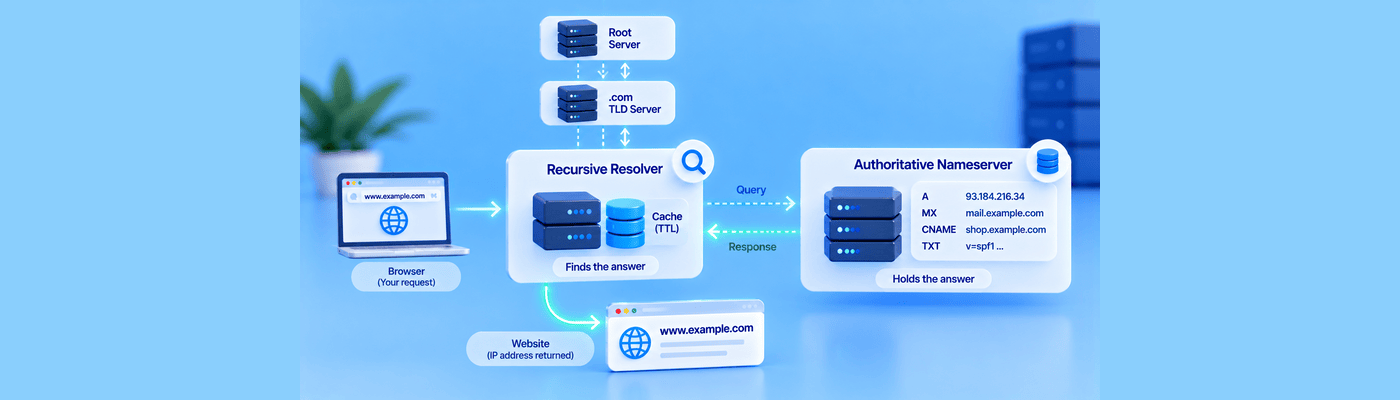
Before diving into specific techniques, it's worth revisiting how DNS changes actually propagate. When you update a record, the change doesn't take effect instantly across the internet. Resolvers cache your records based on their TTL (Time To Live) values, and they won't query your nameservers again until that cache expires.
This caching behavior is normally beneficial. It reduces query load on DNS infrastructure and speeds up resolution for end users. However, during changes, it means your old and new records will coexist in different caches around the world, sometimes for hours or even days if you've set long TTL values.
Understanding this propagation delay is crucial for planning safe changes. You can't simply update a record and immediately verify it worked everywhere. Different users will see different values depending on when their resolver last cached your records and from which nameserver.
The Pre-Change TTL Reduction Strategy
The single most important step in preparing for DNS changes is reducing TTL values well in advance. If your records currently have a 24-hour TTL and you need to make changes tomorrow, you're setting yourself up for a painful experience. Any mistakes will persist in caches for a full day.
A better approach involves planning ahead. At least 48 hours before your intended changes, reduce the TTL on affected records to something much shorter, typically 7200 seconds (2 hours) or even 3600 seconds for critical changes.
This reduction must happen before your changes, not simultaneously with them. If you update both the TTL and the record value at the same time, resolvers that cached the old long TTL will continue using it, defeating the purpose of the reduction.
The timeline looks like this:
Day 1: Reduce TTLs from your current values (often 7200 or 86400 seconds) down to 3600 seconds. Wait for the old TTL period to expire.
Day 3: Make your actual record changes. Because the TTL is now 3600 seconds, your changes propagate within a few hours rather than days.
Day 3+: Monitor the changes and verify everything works correctly.
Day 4+: Once satisfied everything is stable, gradually increase TTLs back to longer values to reduce DNS query load.
This approach provides agility when you need it while maintaining the efficiency benefits of longer TTLs during normal operations.
Canary Records for Safe Testing
Borrowing from software deployment strategies, canary records provide a way to test changes without affecting production traffic. The concept is simple: create a test subdomain that mirrors your production configuration, make your changes there first, and verify everything works before touching production records.
For example, if you're planning to change the A record for www.example.com, you might first create:
canary.example.com. A <new-ip-address>
You can then test this canary thoroughly. Does the new server respond correctly? Are your applications functioning? Is SSL configured properly? Can you access all necessary resources?
This testing happens with a subdomain that isn't serving real user traffic, so problems don't affect your users. Only after confirming the canary works correctly do you apply the same change to your production domain.
For more complex scenarios involving multiple related records, you might create an entire canary subdomain structure:
www.canary.example.com.
api.canary.example.com.
cdn.canary.example.com.
This allows testing how different components interact with the new configuration before production deployment.
Phased Rollout Strategies
When managing DNS for multiple domains or services, avoid changing everything simultaneously. A phased approach limits exposure and provides learning opportunities between stages.
Consider a scenario where you're migrating 50 domains to new hosting infrastructure. Rather than updating all 50 at once, implement changes in waves:
Phase 1: Select 2-3 low-traffic domains that aren't mission-critical. These serve as your real-world test cases. Make the changes, monitor closely for 24-48 hours.
Phase 2: If Phase 1 succeeds without issues, expand to 10-15 domains, including at least one moderately important property. Continue monitoring.
Phase 3: Roll out to the remaining domains in batches, saving your highest-traffic or most critical domains until you've validated the process thoroughly.
This staged approach means that if something goes wrong, you've only affected a small subset of your infrastructure. You can pause the rollout, investigate the issue, implement a fix, and then continue with greater confidence.
Health Checks and Monitoring
DNS changes are only the first step. You need to verify that the systems your DNS points to are actually functioning correctly. Comprehensive health checking should occur at multiple levels.
Before making DNS changes, ensure your destination infrastructure is ready. If you're pointing records at a new server, verify that server is configured, accessible, and serving content correctly. Test from multiple locations to account for geographic variations or network-specific issues.
During the change process, implement monitoring that can detect problems quickly. This might include:
- Synthetic monitoring that regularly queries your domains and verifies expected responses
- Real user monitoring that tracks actual traffic patterns and error rates
- Server health checks that ensure backend systems remain operational
- SSL certificate validation to catch configuration issues with certificate installations
Set up alerts that notify you immediately if metrics deviate from expected values. During DNS changes, someone should be actively monitoring these dashboards, not just relying on automated alerts.
The Rollback Plan
Every DNS change should have a documented rollback plan prepared before you make the first edit. This plan should include:
Previous values: Record the exact current state of all records you're changing. Don't rely on memory or assume you can reconstruct this information. Document IP addresses, priorities, TXT values, and all other relevant data.
Rollback triggers: Define clear criteria for when to abort the change and roll back. Is a 5% error rate acceptable? 1%? Zero? Decide this in advance, not during an incident.
Rollback procedure: Document the exact steps to restore previous configurations. In a crisis, you want a checklist to follow, not creative problem-solving.
Communication plan: Know who needs to be notified if you execute a rollback. This includes internal stakeholders and potentially external partners or customers.
The beauty of DNS changes is that rolling back is usually just another DNS edit. If you've kept your TTLs short, reverting to previous values propagates just as quickly as the original change. This makes DNS changes more reversible than many infrastructure modifications, but only if you've planned for it.
Handling Email Records Specially
Email DNS records deserve extra caution because email problems often manifest silently. A broken MX record doesn't produce immediate error messages for senders. Instead, their mail servers queue messages for retry, potentially for hours or days. By the time you notice problems, you may have lost significant email traffic.
When changing MX records, consider these additional precautions:
Keep your old mail servers operational during the transition. Point both old and new MX records at valid servers, using priority values to prefer the new infrastructure while keeping the old as backup:
example.com. MX 10 new-mail-server.example.com.
example.com. MX 20 old-mail-server.example.com.
This configuration directs new mail to your new servers while providing fallback if those servers are unreachable. Only after confirming the new servers work reliably should you remove the old MX records.
For email authentication records (SPF, DKIM, DMARC), make changes conservatively. An incorrect SPF record can cause your mail to be rejected by recipients. When updating SPF, ensure your new record includes all legitimate sending sources. Consider temporarily using ~all (soft fail) instead of -all (hard fail) during transitions, providing a safety net if you've missed a sending source.
Automation and Infrastructure as Code
For organizations managing DNS across many domains, manual change management doesn't scale. Infrastructure-as-code approaches bring software development practices to DNS management, including version control, code review, and automated testing.
Tools like Terraform, Ansible, or provider-specific APIs let you define DNS configurations in code files. Changes go through pull requests where team members can review them before implementation. You can run automated validation tests that check for common errors like invalid IP addresses or incorrect syntax.
Version control provides an automatic rollback mechanism. If changes cause problems, you can revert to the previous committed configuration and re-deploy. This is faster and more reliable than manually reconstructing previous states.
Even without full infrastructure-as-code adoption, simple automation helps. Scripts that update multiple records consistently reduce human error compared to manual edits through web interfaces. They also provide documentation of exactly what changed.
Geographic Considerations
DNS propagation isn't uniform across the globe. Resolvers in different regions may cache records differently, and network connectivity issues can affect some areas while others work fine. When making significant changes, test from multiple geographic locations.
Use testing tools that query DNS from various countries and networks. Verify your changes have propagated to major public resolvers like Google DNS (8.8.8.8), Cloudflare DNS (1.1.1.1), and others. Check that the infrastructure your DNS points to is actually accessible from different regions.
For globally distributed services, consider using geographic DNS routing that directs users to regional infrastructure. When changing these configurations, test each region independently to ensure users everywhere receive appropriate responses.
Common Pitfalls and How to Avoid Them
Even with careful planning, certain mistakes occur frequently enough to warrant specific attention.
The premature TTL increase: After successfully implementing changes, there's temptation to immediately restore longer TTL values. Resist this urge. Keep TTLs short for at least 24 hours after changes, ensuring any unexpected issues can be addressed quickly.
The incomplete rollback: When rolling back, it's easy to miss a related record. If you changed both an A record and a corresponding AAAA record, ensure your rollback addresses both. Partial rollbacks can create confusing mixed states.
The untested destination: Changing DNS to point at infrastructure that hasn't been fully tested is surprisingly common. Always verify your destination servers are configured and functional before directing traffic to them.
The forgotten dependency: DNS records often have dependencies you might not realize. Changing a CNAME might affect multiple services that reference it. Altering nameserver records impacts your entire zone. Map these dependencies before making changes.
The holiday deployment: Avoid significant DNS changes during periods when support staff are limited. Late Friday afternoons, holidays, and major events are poor times for risky operations. If something goes wrong, you want your full team available.
Documentation and Communication
Good documentation makes the difference between a smooth change and a chaotic scramble. Document not just what you're changing, but why, when, and what success looks like.
A change plan should include:
- Specific records being modified, with before and after values
- Justification for the changes
- Expected impact and timeline
- Testing procedures and success criteria
- Monitoring dashboards to watch during the change
- Rollback procedures and triggers
- Contact information for all involved parties
Communicate these plans to relevant stakeholders before implementation. Even if they're not directly involved, people appreciate knowing when potentially disruptive changes are happening.
During the change, provide status updates. Let people know when you've started, how monitoring looks, and when you've completed successfully or rolled back. This communication builds confidence in your processes and ensures everyone has context if problems arise.
Learning from Each Change
After completing DNS changes, especially significant ones, conduct a brief retrospective. What went well? What could improve? Were there unexpected issues? Did your monitoring catch problems quickly enough?
Document lessons learned and update your procedures accordingly. Over time, this builds institutional knowledge and continually refines your change-management practices.
If problems occurred, perform a thorough postmortem without blame. Understanding root causes prevents recurrence and often reveals systemic issues that affect more than just DNS operations.
Building Confidence Through Practice
DNS change management is a skill that improves with practice. Start with low-risk changes to build experience with your procedures. Practice rollbacks during non-critical times so the process is familiar when you need it under pressure.
Consider running occasional fire drills where you deliberately make a test change and then roll it back, timing how long the process takes and identifying any gaps in your procedures.
This practice is valuable for your entire team, not just the person who typically handles DNS. When multiple team members understand the processes, you have backup during emergencies and prevent DNS management from becoming a single point of failure.
Conclusion
Safe DNS change management combines technical understanding with operational discipline. The techniques we've discussed—TTL reduction, canary testing, phased rollouts, comprehensive monitoring, and prepared rollback plans—work together to minimize risk while maintaining the ability to make necessary changes.
None of these practices are particularly complex individually. Their power comes from systematic application. By following a consistent change-management playbook, you transform DNS updates from nerve-wracking events into routine operations.
The investment in proper change management pays dividends beyond just avoiding outages. It builds confidence within your team, provides clear documentation for compliance and auditing, and allows you to move faster overall because you can make changes without fear.
Whether you're managing DNS for a single domain or orchestrating changes across a complex infrastructure, these principles scale to meet your needs. Start with the fundamentals, adapt them to your specific situation, and continuously refine your approach based on experience.
DNS changes will always carry some inherent risk, but with thoughtful planning and disciplined execution, that risk becomes manageable. Your goal isn't to eliminate all possibility of problems but to catch issues early, respond quickly, and maintain control throughout the process.
NameSilo Staff
The NameSilo staff of writers worked together on this post. It was a combination of efforts from our passionate writers that produce content to educate and provide insights for all our readers.