How to Flush DNS Cache on Google, Cloudflare, and OpenDNS

You can flush a stale DNS record from the most popular public resolvers using their own tools: Google's Flush Cache page, Cloudflare's 1.1.1.1 Purge Cache page, and OpenDNS CacheCheck. Enter your domain and record type, submit, and that resolver drops its cached answer. These tools clear only those resolvers, not every ISP.
What Is DNS Caching?
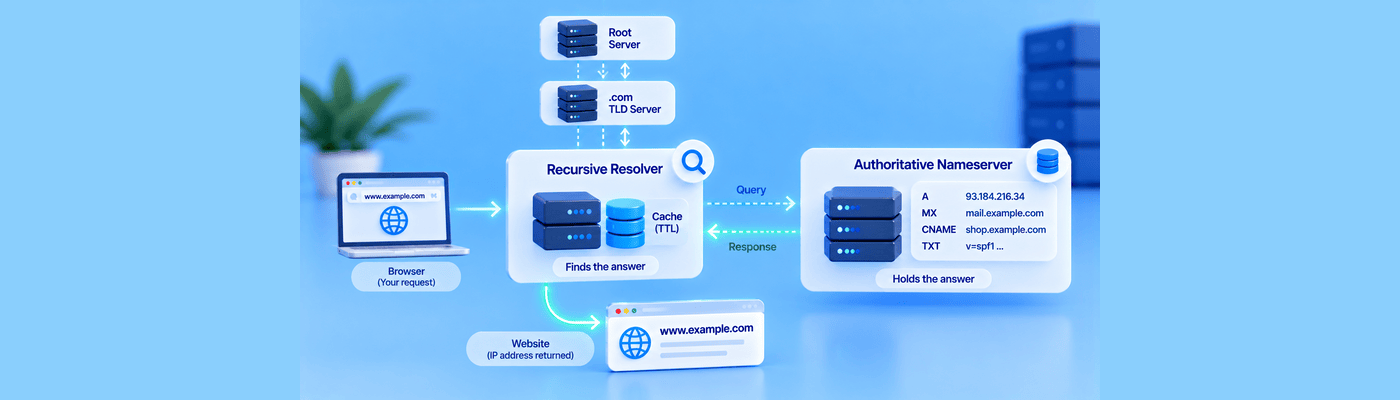
When a recursive DNS resolver retrieves a record from an authoritative nameserver, it can cache that answer according to the record's TTL (Time to Live) and its own caching policies. Subsequent requests can then be answered from the cache without repeating the full DNS lookup. Resolvers can also briefly remember that a record is missing or a lookup failed. Google Public DNS, Cloudflare 1.1.1.1, and OpenDNS each keep their own cache, so each can hold an old answer after you change your records.
Why It Matters
After a website migration or DNS record change, your authoritative nameservers may already return the correct information while recursive resolvers continue serving older cached answers. Google Public DNS, for example, generally limits cached TTLs to six hours, even when the original TTL is longer. Public resolver cache-flushing tools can shorten this waiting period by allowing you to request a refresh before the cached record would normally expire.
How the Three Tools Compare
Resolver | Tool | What you enter | Speed |
Google Public DNS | Flush Cache | Domain, record type, reCAPTCHA | Not stated |
Cloudflare 1.1.1.1 | Purge Cache | Domain, record type | A few seconds |
OpenDNS | CacheCheck | Domain | Up to 20 seconds |
Each tool clears only its own resolver. None touches your ISP's resolver, a router, or a device. Refreshing these public resolvers can help visitors who depend on them receive updated DNS information sooner. However, browsers, operating systems, routers, and intermediate DNS services may still retain older cached answers independently. Visitors on other resolvers must wait for the TTL to expire.
Flushing Each Resolver
Google: Open the Flush Cache page, enter the domain and record type, complete the reCAPTCHA, and submit. Ownership proof is not required.
Cloudflare: Open the Purge Cache page, enter the domain, choose a record type, and click Purge Cache. It reaches all of Cloudflare's data centers in seconds.
OpenDNS: Open CacheCheck, enter the domain, review what customers see in each region, and request a refresh if it looks wrong.
Verify: Run the following commands to compare the answers returned by all three public DNS resolvers:
nslookup yourdomain.com 8.8.8.8
nslookup yourdomain.com 1.1.1.1
nslookup yourdomain.com 208.67.222.222
For a specific record type, such as MX or TXT, use nslookup -type=MX yourdomain.com 8.8.8.8 and substitute the appropriate record type and resolver address.
Common Mistakes
Flushing before verifying authoritative DNS. Query your authoritative nameservers directly to confirm they are serving the updated record. Otherwise, the resolver may simply retrieve and cache the same incorrect information again.
Flushing subdomains first after a nameserver change. Google recommends flushing the main domain before subdomains such as www to prevent them from being refreshed using outdated delegation information.
Choosing the wrong record type. Flush the affected record type. For stale CNAME chains on Google Public DNS, flush each CNAME starting from the end of the chain, followed by the affected queried records.
Expecting it to fix your own device. Your browser and operating system may maintain separate DNS caches.
Assuming it clears every ISP. Public resolver flushing tools only affect their respective DNS services.
Confusing Cloudflare DNS with its CDN cache. Purging the 1.1.1.1 resolver cache refreshes DNS information. Purging Cloudflare's CDN cache removes cached website content. These are different operations.
What This Means for You
When you update records in NameSilo's DNS Manager, provided your domain uses NameSilo's nameservers, first confirm that the authoritative DNS servers return the correct information. If public resolvers still return older answers, request a cache refresh and verify the results.
For planned migrations, lower the relevant DNS record's TTL sufficiently far in advance for previously cached answers to expire. This can reduce the waiting period when you eventually make the change. Starting a new site? Search for your domain first.
Frequently Asked Questions
What is DNS cache?
Temporary storage of lookup answers that resolvers keep for the record's TTL.
How do I flush Google DNS cache?
Use Google's Flush Cache page with your domain, record type, and a reCAPTCHA.
How do I flush Cloudflare 1.1.1.1 cache?
Use the Purge Cache page, enter the domain, and choose a record type.
How do I clear the OpenDNS cache?
Check the domain in CacheCheck, then request a refresh. It can take up to 20 seconds.
Does flushing public resolvers fix every user?
No. It helps people using those resolvers, not other ISPs, routers, or devices.
How long does a flush take?
Cloudflare takes seconds and OpenDNS up to 20 seconds. Google does not state a time.
Do I need to own the domain to flush it?
Google's tool does not require proof of ownership.
Why does my site still show the old IP after flushing?
Another cache holds it, such as your ISP, router, or browser, or the record is not saved.
Can every DNS record be flushed using public resolver tools?
Not necessarily. Each resolver has its own limitations. Google Public DNS, for example, cannot flush certain domains using EDNS Client Subnet (ECS) for geographic DNS responses. In these situations, you may need to wait for the cached records to expire naturally.
NameSilo Staff
The NameSilo staff of writers worked together on this post. It was a combination of efforts from our passionate writers that produce content to educate and provide insights for all our readers.