Why Does My Website Work Fine but Downloads Fail?
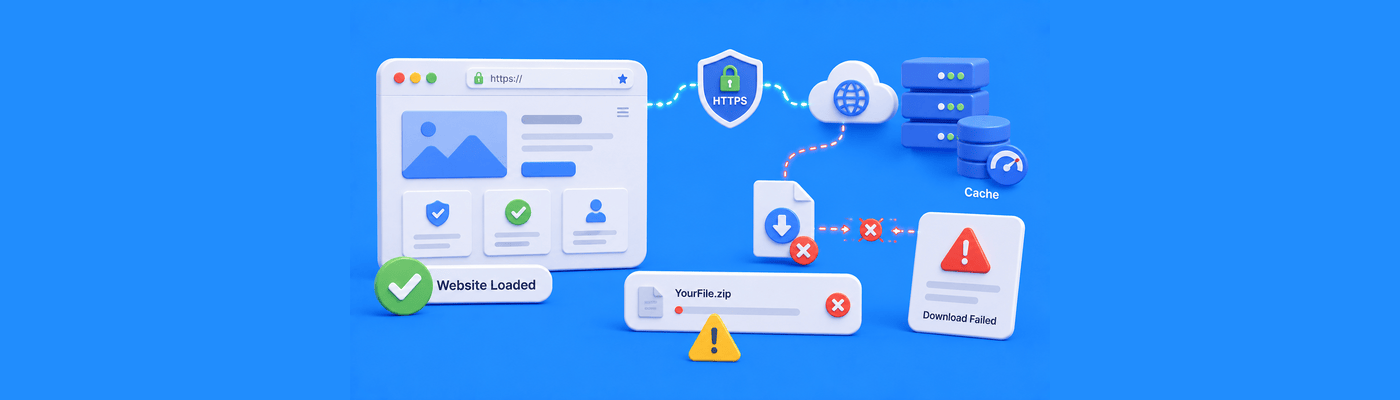
If your website loads normally but downloads fail, the issue usually exists somewhere deeper inside the file delivery process rather than the visible website itself. Modern browsers treat downloadable files very differently from ordinary webpages. Even when the website appears completely healthy, browsers, CDNs, antivirus systems, HTTPS policies, or server configurations may quietly block or distrust the download underneath.
Why This Problem Feels So Strange
One of the stranger things about modern websites is that broken downloads can hide behind an otherwise perfectly functional-looking site.
Customers continue browsing normally.
Pages still load quickly.
Images display correctly.
Navigation works without problems.
Then someone clicks a PDF, ZIP file, invoice, brochure, installer, or media download and suddenly the experience changes completely.
Sometimes nothing happens at all.
Sometimes the browser displays a vague warning.
Sometimes the file begins downloading before quietly failing halfway through.
From the visitor’s perspective, the website itself does not appear broken, which makes the behavior feel inconsistent and difficult to explain.
For website owners, the situation becomes even worse because download failures often go unnoticed initially. A business may continue receiving normal traffic while customer resources, onboarding documents, software files, or downloadable products quietly stop working in the background.
Browsers No Longer Blindly Trust Downloads
A lot of website owners assume downloading a file works the same way as opening a webpage. Modern browsers no longer treat those actions equally.
Webpages are primarily rendered visually. Downloads trigger a completely different set of security and trust evaluations behind the scenes.
Today’s browsers constantly analyze:
- how the file is delivered
- whether HTTPS is fully secure
- whether the file type appears trustworthy
- whether the server metadata matches expectations
- whether redirects behave suspiciously
- whether the download resembles known malware behavior
That means a website can load perfectly while the browser simultaneously distrusts the downloadable file itself.
This is why download failures often seem irrational at first. The visible website appears healthy, but the browser is evaluating the file delivery process using an entirely different set of security rules.
HTTPS Problems Often Appear Only During Downloads
One of the more confusing situations happens when the website itself loads securely over HTTPS, but the downloadable file still points to an older insecure location somewhere deeper in the delivery chain.
A browser may happily display the secure padlock on the website while quietly blocking the actual file because the download itself still routes through:
- HTTP links
- insecure redirects
- outdated CDN paths
- old subdomains
- legacy file endpoints
Modern browsers increasingly block these “mixed downloads” because they create security risks.
This catches many website owners off guard because they assume:
“The website is secure, so the downloads must be secure too.”
Unfortunately, browsers evaluate the file delivery path separately.
Sometimes the File Is Fine but the Browser Stops Trusting It
Oddly enough, download failures are not always caused by damaged files.
Sometimes the issue is simply that the browser no longer trusts how the server describes the file.
A PDF may suddenly download as unreadable text.
A ZIP archive may appear corrupted.
An image file may refuse to open correctly after downloading.
In many of these situations, the actual file itself remains perfectly intact. What changed is the metadata surrounding the delivery process.
Modern browsers rely heavily on server headers and MIME information to determine whether downloaded content behaves as expected. If something about the file presentation appears inconsistent, browsers may become cautious very quickly.
This becomes especially common after:
- server migrations
- CDN changes
- manual configuration edits
- caching changes
- hosting transfers
The website owner may believe the file itself broke when the browser simply stopped trusting the way it is being delivered.
CDN and Cache Behavior Can Create Inconsistent Downloads
Content delivery networks make websites faster, but they also introduce additional layers between the visitor and the actual file.
Sometimes those layers behave unpredictably.
A CDN may continue serving:
- outdated file versions
- expired file headers
- partially cached downloads
- broken redirects
- stale security policies
while the main website itself updates normally.
This is one reason download failures often feel inconsistent across users or devices. One visitor may successfully download the file while another receives an error because different CDN edge locations still hold different cached states temporarily.
From the outside, the website appears healthy.
Underneath, the file delivery system may no longer be synchronized properly.
Security Software Sometimes Interrupts Downloads Quietly
Another thing that surprises people is how often download failures originate on the visitor’s own device rather than the website itself.
Modern antivirus and endpoint protection systems actively inspect downloads in real time. If something appears suspicious, the software may:
- pause the transfer
- quarantine the file
- block the download silently
- remove the file immediately after download
- display browser warnings
This becomes especially common with:
- ZIP archives
- executable files
- backup exports
- compressed downloads
- unfamiliar file types
From the visitor’s perspective, it looks like the website failed even though local security software actually interrupted the file during delivery.
Mobile Devices Handle Downloads Differently
Download behavior on mobile devices is often much stricter than on desktop systems.
Some mobile browsers aggressively restrict:
- automatic downloads
- large files over cellular data
- unknown file types
- background file transfers
- insecure download behavior
This creates situations where a file works perfectly on desktop but repeatedly fails on mobile.
Users often interpret this as random website instability when the actual difference comes from how mobile operating systems handle download trust and storage permissions behind the scenes.
Download Problems Often Start After Website Changes
One reason download failures are so frustrating is that they frequently appear after otherwise successful website updates.
A website migration may complete correctly while file permissions quietly change underneath.
A CDN optimization may improve speed while interfering with attachment delivery.
A new security policy may accidentally block legitimate downloads.
The visible website continues functioning normally, which delays discovery of the actual problem.
This is one reason businesses sometimes lose customer downloads, onboarding documents, or client resources without realizing it immediately.
Why Website Owners Often Misdiagnose the Issue
When downloads fail, many users initially assume:
- hosting crashed
- bandwidth limits were reached
- the server is offline
- DNS failed
- the website itself broke
when the actual issue usually exists somewhere inside the browser trust and file delivery pipeline instead.
Downloads pass through a very different set of rules than ordinary webpages. Browsers, CDNs, security systems, HTTPS policies, and operating systems all participate in evaluating whether the file should be trusted before the transfer completes.
Understanding that distinction is what usually makes these problems easier to troubleshoot.
Final Thoughts
If your website works fine but downloads fail, the visible website is often only a small part of the real system involved.
Modern browsers no longer blindly trust downloadable files simply because the surrounding website appears functional. File transfers now pass through multiple layers of trust evaluation involving HTTPS validation, browser security heuristics, CDN behavior, server metadata, caching systems, and local security software before the download fully completes.
That is why download problems often feel inconsistent and surprisingly difficult to diagnose at first. The visible website may remain completely healthy while the hidden delivery pipeline quietly breaks underneath.
NameSilo Staff
The NameSilo staff of writers worked together on this post. It was a combination of efforts from our passionate writers that produce content to educate and provide insights for all our readers.