
Configuring Remote MySQL Access in cPanel
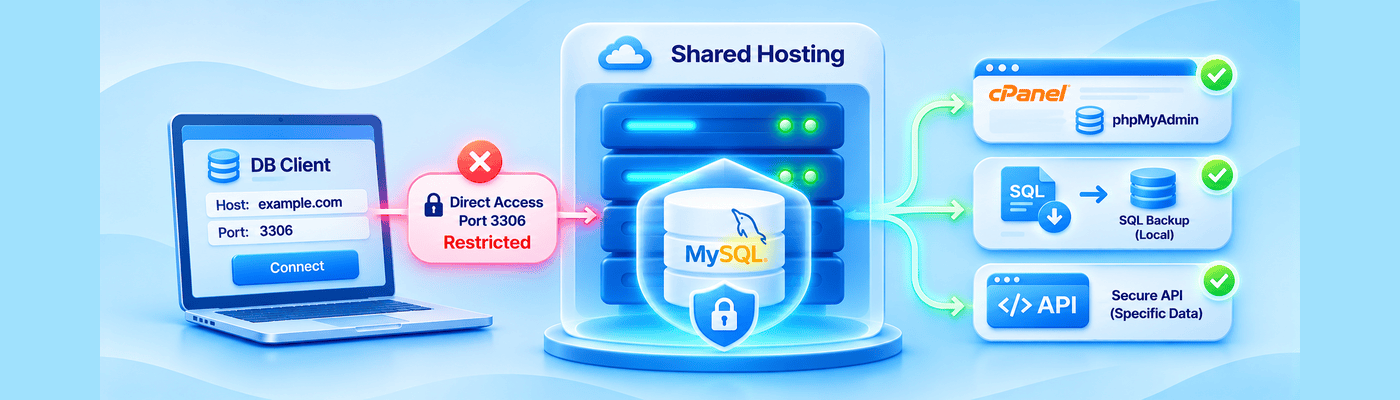
Remote MySQL access allows developers to connect to a hosted database using desktop applications such as MySQL Workbench and DataGrip. However, not every cPanel hosting provider enables external database connections. NameSilo's shared hosting does not provide direct Remote MySQL or SSH access. Customers can instead manage their databases through phpMyAdmin, download backups for local development, or build narrowly scoped application APIs when external systems need access to specific data.
What Is Remote Database Access?
Remote database access allows an application running outside your hosting environment to connect directly to a hosted database.
On supported cPanel servers, the Remote Database Access feature allows administrators to authorize external hosts to connect to MySQL, typically using port 3306.
NameSilo's shared hosting does not provide direct remote database connections or SSH tunneling. Adding an IP address to an allowlist does not override these server-level restrictions.
Instead, customers can manage databases through phpMyAdmin, export database backups for local use, or develop application-specific HTTPS APIs that expose only the data required by an external service.
Why It Matters
Developers often prefer desktop database tools for running queries, generating reports, and analyzing large datasets. However, exposing a database directly to the internet introduces additional security considerations.
Shared hosting environments typically restrict external database connections to reduce unnecessary exposure. Understanding these restrictions helps you choose an appropriate way to manage your data without compromising the security of your website.
Managing Your Database Without Remote MySQL
Using phpMyAdmin
Log in to cPanel and open phpMyAdmin under the Databases section. From here, you can browse tables, execute SQL queries, import and export data, and manage existing database records without exposing the MySQL service to external connections.
Working With a Local Database
If you prefer MySQL Workbench or DataGrip, export your database through phpMyAdmin or download a database backup through cPanel. Import the SQL file into a compatible database server running on your computer.
This allows you to develop applications, test queries, and analyze data without affecting your production website. Remember that the local database is a snapshot, not a live connection to your hosting account.
Connecting External Applications Through an API
If an external application needs access to live website data, consider using an existing application API or developing an endpoint for a specific business function.
For example, an inventory application could request product availability without receiving unrestricted access to the entire database.
Use predefined queries, parameter validation, authentication, HTTPS, restricted database permissions, and appropriate request limits. Avoid creating endpoints that accept arbitrary SQL statements from external clients.
Common Mistakes
Assuming every cPanel feature is available. Hosting providers can restrict Remote Database Access and other interfaces according to their server configuration.
Changing database permissions unnecessarily. Granting additional privileges to a database user does not open a blocked network port.
Allowing unrestricted remote hosts. On servers that support remote database connections, avoid wildcard access and restrict connections to authorized sources.
Exposing arbitrary SQL through PHP. An internet-facing database relay can introduce serious security risks, even when configured for read-only access.
Testing directly against production data. Use a local database copy or staging environment when developing and testing queries.
Leaving database backups in public directories. SQL exports may contain sensitive information and should never be stored in publicly accessible locations.
What This Means for You
Direct remote database access is not necessary for most website administration tasks. NameSilo's cPanel hosting includes phpMyAdmin and database management tools that allow you to manage your website's data within the hosting environment.
For development, download a database backup and work with a local copy. If another application needs live data, consider a properly secured, application-specific API rather than exposing your database directly.
If your project specifically requires persistent remote MySQL connections or SSH tunneling, consider a hosting environment designed to support those requirements.
Explore our hosting plans to find the right environment for your website.
Frequently Asked Questions
How do I allow remote MySQL connections in cPanel?
On supported hosting environments, use the Remote Database Access interface to authorize external hosts. This feature is not available on NameSilo's shared hosting.
What is Remote MySQL?
Remote MySQL, now called Remote Database Access in newer versions of cPanel, allows authorized external hosts to connect to a hosted database.
Can I connect MySQL Workbench directly to NameSilo hosting?
No. Direct remote database connections and SSH tunneling are not supported. You can export your database and import it into a local MySQL server to work with MySQL Workbench.
What port does remote MySQL use?
MySQL uses TCP port 3306 by default, although server administrators can configure a different port.
Is remote MySQL access safe?
It can be when properly configured with encrypted connections, restricted network access, strong authentication, and least-privilege database accounts. Exposing MySQL without these protections introduces unnecessary security risks.
Why is my remote database connection failing?
Possible causes include firewall restrictions, disabled remote access, incorrect credentials, insufficient database permissions, or an incorrect database hostname.
Can I manage my database without Remote MySQL?
Yes. NameSilo customers can use phpMyAdmin to manage databases, execute SQL queries, and import or export data through cPanel.
Can an external application access my website's data?
Yes, if the website provides an appropriate API. A properly secured API can expose specific application data without granting direct access to the underlying database.
NameSilo Staff
The NameSilo staff of writers worked together on this post. It was a combination of efforts from our passionate writers that produce content to educate and provide insights for all our readers.