How to View and Download Your NameSilo Invoices
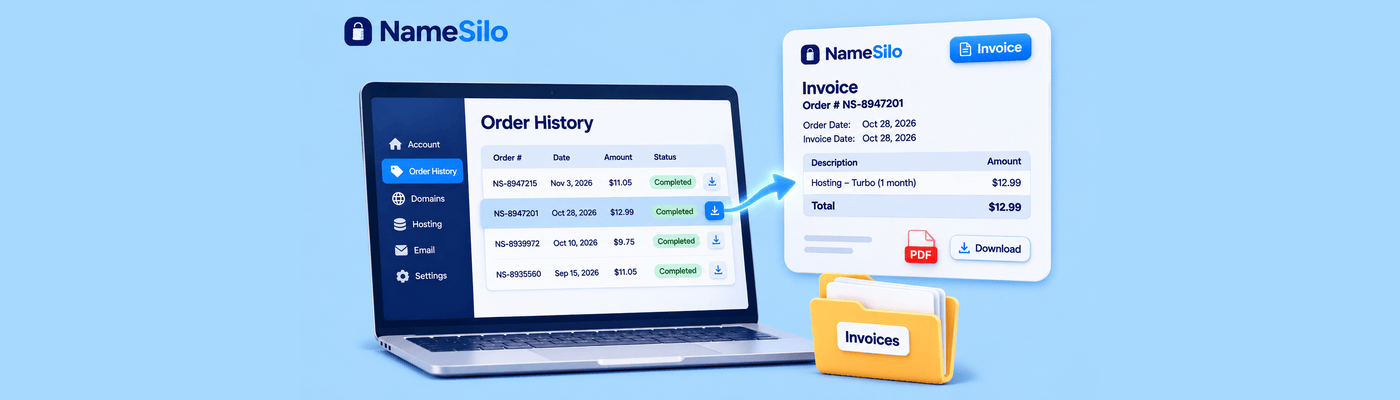
To view and download your NameSilo invoices, log in and open the Order History page. It lists every order you have placed, including domain registrations and renewals. Click an order number to open that order, then choose the download invoice option to save the invoice for your accounting records.
How the Billing Ledger Tracks Your Spending
Order History is the central ledger for your account. Every order you place gets its own order number and its own invoice, so each registration, transfer, and renewal has a separate record. If your country uses VAT numbers or company numbers, they appear on your invoices.
Why It Matters: Financial Compliance
At tax time, your accountant needs a document for every domain expense. Collecting them from a year of email is slow, and a missed message means a missing deduction. Order History keeps every record in one place, so you can pull what you need quickly, without a support ticket.
Accessing Order History
Log in to your NameSilo account.
Open the Order History page from your account.
Find the order you need in the list.
Click the order number to open the order details.
Click on View Invoice.
Choose the print option to download the invoice
For a PDF, choose Save as PDF in your browser's print dialog.
Downloading Invoices for Bookkeeping
Download an invoice for each order. Save each file with its order number in the name, in a folder for that tax year, and your accountant can review them as they are.
Check your VAT number or company number before you start. Add them on your account maintenance page if they are missing, since they appear on invoices.
Successful auto-renewals also send an order receipt to the account holder. That email is a convenience copy. Order History remains the complete record.
Common Mistakes
The most common one is assuming an Account Funds receipt itemizes the domains you renewed. Account Funds is a prepaid wallet. When you add money, that is a deposit, not a domain purchase.
When funds later pay for a renewal, the renewal is a separate ledger item with its own order number and invoice. Download that invoice for domain costs, and keep the deposit record only for your funding history. Learn more in our Account Funds Manager guide.
Another mistake is waiting for year-end. Pull invoices as you buy.
What This Means for You
Treat Order History as your bookkeeping source. Download invoices when you buy or renew, and send your accountant the renewal invoices rather than the deposit records. Keep your default billing profile current under Account Options so auto-renewals go through. If you cannot find an order, our support center can help. Ready to add another name? Search and register a domain.
Frequently Asked Questions
How do I get a receipt from NameSilo?
Open Order History, click the order number, and choose the View Invoice
Where is my order history in NameSilo?
On the Order History page in your account. It lists every order you have placed.
Can I download domain invoices as PDFs?
Yes. Download the invoice from the order, or print it and choose Save as PDF in your browser.
How do I find a past domain renewal charge?
Find the renewal in Order History and open its order number. Renewals paid from Account Funds have their own order.
How do I check my NameSilo account balance?
Open the Account Funds Manager under Billing Options. You can also add funds and set automatic replenishment there.
Are domain names tax deductible?
Often, when used for business, but rules vary by country and use. Ask your tax professional, as we cannot give tax advice.
How do I update my billing information at NameSilo?
Open Billing Manager under Account Options and edit your billing profile. We email you if your default profile is about to expire.
NameSilo Staff
The NameSilo staff of writers worked together on this post. It was a combination of efforts from our passionate writers that produce content to educate and provide insights for all our readers.