Why Did My Website Disappear from Google?
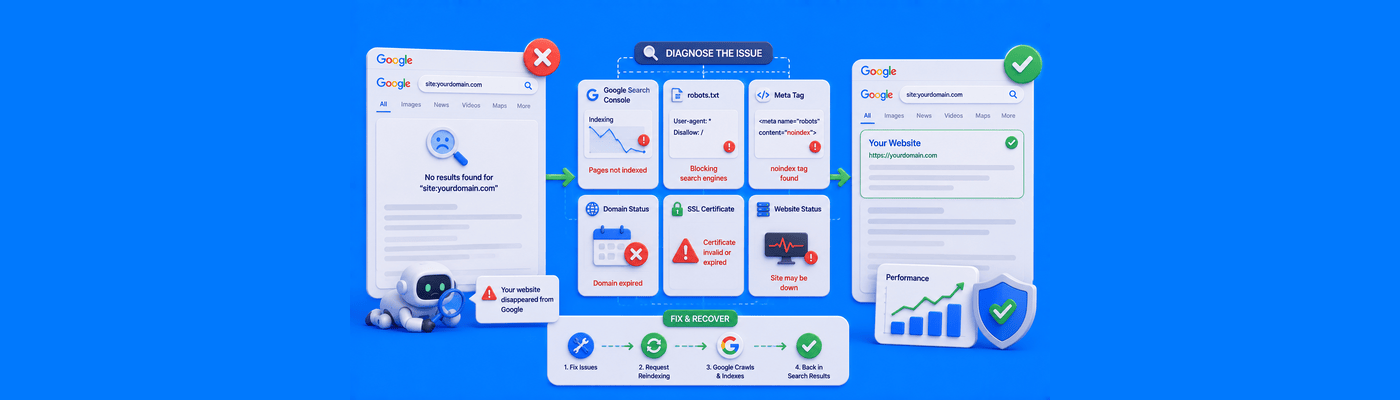
If your website suddenly disappeared from Google, first check if your site is offline or if your domain expired. If the site is live, log into Google Search Console. Check the Manual Actions tab to see if a human reviewer penalized your site for spam violations, or check for crawling errors caused by an accidental noindex tag blocking Google.
The Fastest Diagnostic: The site: Operator
Before touching any settings, open a new browser tab and search:
site:yourdomain.com
This tells Google to show only pages it has indexed from your domain.
If pages appear: Your site is indexed but has dropped in ranking. This points toward an algorithmic issue, not a technical block.
If zero pages appear: Your site is fully de-indexed. This points toward a technical blackout or a manual action, both far more urgent to resolve.
This single search instantly separates a ranking problem from an indexing problem, and everything else in your investigation depends on knowing which one you're dealing with.
Root Cause 1: Technical Blackouts
The least dramatic explanation is often the correct one.
Check first, in this order:
- Is the domain expired? Log into your registrar and confirm the registration is active.
- Is the SSL certificate broken? An expired or misconfigured certificate can make your site inaccessible to crawlers.
- Did someone add a noindex tag? Check your page's HTML head for <meta name="robots" content="noindex">, and check for an X-Robots-Tag: noindex HTTP header too.
- Is robots.txt blocking Google? Visit yourdomain.com/robots.txt and look for a Disallow: / rule blocking your entire site.
Technical blackouts are usually the result of one small accidental change: a plugin update, a staging site pushed to production with noindex still active, or a domain that quietly expired.
Root Cause 2: Manual Actions
If the site loads fine and site: shows zero pages, check Google Search Console under Security & Manual Actions > Manual Actions.
A manual action means a human reviewer at Google, not an algorithm, determined your site violates spam policies. Common triggers include hacked content, spammy user-generated comments, unnatural link schemes, or structured data manipulation.
If a manual action appears, the report tells you exactly which policy was violated and which pages are affected. Fix every instance, then submit a reconsideration request explaining what was wrong and what you did to fix it.
Root Cause 3: Algorithmic Updates
If site: shows your pages are still indexed but rankings collapsed anyway, no manual action exists, and your Search Console shows nothing under Security & Manual Actions, you likely lost visibility to a core algorithm update.
This isn't a penalty. It's Google recalculating relevance across the entire web, and your content no longer scores as competitively against sites that improved. Recovery here comes from content and authority improvements, not a single technical fix.
Common Mistakes
Panicking and rebuilding the entire site before diagnosing: A full redesign often destroys the exact internal linking structure, URL paths, and content depth that could have driven recovery. Diagnose first. Rebuild only if the diagnosis specifically calls for it.
Assuming every drop is a penalty: Most traffic drops are technical or algorithmic, not punitive. Checking Manual Actions takes thirty seconds and rules out the scariest explanation immediately.
What This Means for You
The simplest blackout to prevent is an expired domain. Enable Automatic Renewals so your domain never lapses silently. If you're hosting with NameSilo, Hosting support can help rule out server-side causes. Need a fresh domain for a rebuild? Search available names.
Frequently Asked Questions
How do I know if Google penalized my site?
Check Search Console under Security & Manual Actions for an active manual action.
What is a Google manual action?
A penalty applied by a human reviewer for violating Google's spam policies.
Why is my website not indexed on Google?
Likely a noindex tag, robots.txt block, or expired domain.
How do I fix a noindex error?
Remove the noindex meta tag or HTTP header, then request re-indexing.
Can an expired domain hurt SEO?
Yes. An expired domain immediately de-indexes and can lose accumulated authority.
How long does it take to recover from a Google penalty?
Reconsideration reviews typically take days to several weeks.
What is the site: search command?
A search operator showing exactly which of your pages Google has indexed.
How do I check my domain expiration at NameSilo?
Log in, go to Domain Manager, and view the expiration date column.
NameSilo Staff
The NameSilo staff of writers worked together on this post. It was a combination of efforts from our passionate writers that produce content to educate and provide insights for all our readers.