How to Fix WordPress "Error Establishing a Database Connection"

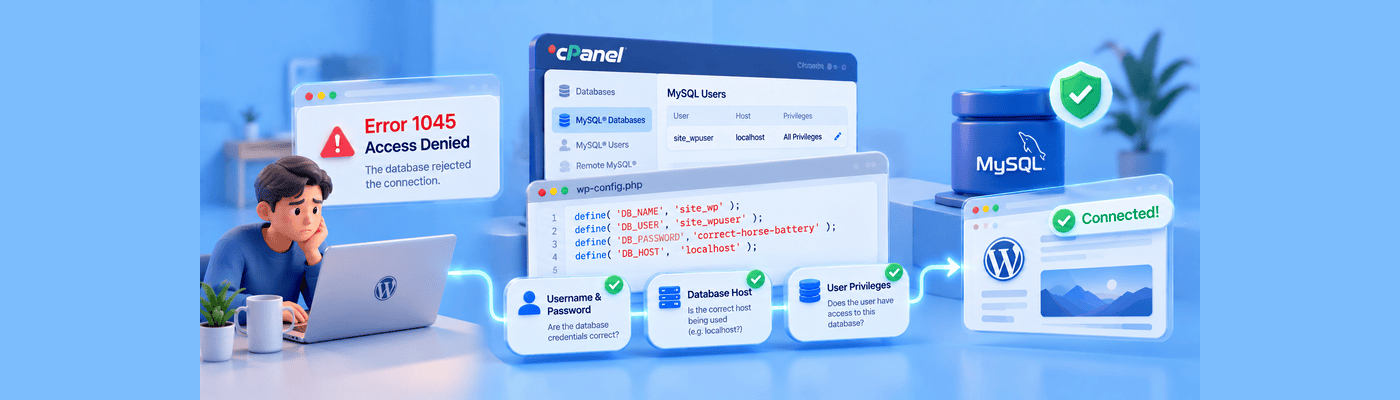
The "Error Establishing a Database Connection" in WordPress means your website files cannot communicate with your SQL database. This is usually caused by incorrect database login credentials in your wp-config.php file, a corrupted database, or your web hosting server being overloaded. To fix it, verify your database username, password, and host name.
How WordPress Connects to MySQL
WordPress is a PHP application that stores all content in a MySQL database:
Component | Function |
WordPress files | PHP code that generates pages |
MySQL database | Stores posts, pages, users, settings |
wp-config.php | Contains database login credentials |
The connection flow: When someone visits your site, WordPress reads wp-config.php, uses those credentials to connect to MySQL, retrieves content, and renders the page.
If any credential is wrong: Connection fails. WordPress can't retrieve content. You see the error.
This error means WordPress is running but can't reach its database. Your files exist, they just can't access the data.
Root Cause 1: Incorrect Credentials
The #1 cause, 90% of cases. The password in wp-config.php doesn't match the database password in your hosting panel.
How this happens:
- You changed your hosting or database password
- You migrated from another host with different credentials
- Your host reset credentials during maintenance
- You created a new database user but didn't update wp-config.php
The fix: Open wp-config.php and verify these four values match your hosting control panel:
define('DB_NAME', 'your_database_name');
define('DB_USER', 'your_database_user');
define('DB_PASSWORD', 'your_database_password');
define('DB_HOST', 'localhost');
DB_HOST: Usually localhost for shared hosting. Some hosts require a specific server address, check your hosting documentation.
Root Cause 2: Server Overload or Database Crash
If credentials are correct but error persists, your database server may be down.
Shared hosting vulnerability: MySQL runs as a separate service. During traffic spikes, the database can crash while the web server stays up.
Signs of server issues: Error appears intermittently, started during high traffic, phpMyAdmin also won't connect.
The fix: Wait 15-30 minutes for recovery, or contact your host. If frequent, your site has outgrown shared hosting.
Implementation Steps: Verify and Fix Credentials
Step 1: Access File Manager or FTP Log into cPanel → File Manager, or connect via FTP client (FileZilla).
Step 2: Navigate to WordPress Root Find your WordPress installation (usually public_html or www).
Step 3: Download wp-config.php Make a backup copy before editing.
Step 4: Open with Plain Text Editor Use Notepad, VS Code, or Sublime Text. Never use Word or rich-text editors.
Step 5: Verify Database Credentials Compare DB_NAME, DB_USER, DB_PASSWORD, DB_HOST against your hosting panel's database section.
Step 6: Update and Re-upload If any value is wrong, correct it, save the file, and upload to replace the original.
Step 7: Test Your Site Refresh your website. The error should be gone.
Step 8: Repair Database (If Needed) If credentials are correct, add this line to wp-config.php temporarily:
define('WP_ALLOW_REPAIR', true);
Then visit: yoursite.com/wp-admin/maint/repair.php
Remove the line after repair completes.
Common Mistakes
Editing with Word or rich-text editors: These add invisible formatting characters that break PHP. Always use plain-text editors.
Copying credentials with extra spaces: Trailing spaces in passwords cause authentication failures. Triple-check for whitespace.
Wrong DB_HOST value: Some hosts use IP addresses or server names instead of localhost. Verify with your hosting documentation.
Not saving as UTF-8: Incorrect encoding corrupts the file. Save as UTF-8 without BOM.
What This Means for You
NameSilo Hosting includes cPanel with easy database management. Access phpMyAdmin to verify credentials, repair tables, or create new database users without command-line complexity.
Database issues are usually credential mismatches, check wp-config.php first.
Frequently Asked Questions
What causes the error establishing a database connection?
Wrong credentials, crashed database, or server overload.
How do I check my WordPress database credentials?
Open wp-config.php and compare against the hosting panel.
What is wp-config.php?
Configuration file containing database credentials.
How do I fix a corrupted WordPress database?
Enable WP_ALLOW_REPAIR and visit repair URL.
Is my website hacked if I see a database error?
Usually no. Most cases are credential issues.
What is localhost in WordPress?
Database host address for same-server databases.
Why does my database keep crashing?
Traffic exceeds resources.
How do I access phpMyAdmin?
cPanel → Databases → phpMyAdmin.
NameSilo Staff
The NameSilo staff of writers worked together on this post. It was a combination of efforts from our passionate writers that produce content to educate and provide insights for all our readers.