

Websites & Hosting4 min
How to Fix "MySQL File Size Limit Exceeded" in phpMyAdmin
NS
NameSilo Staff9/9/2026
Share
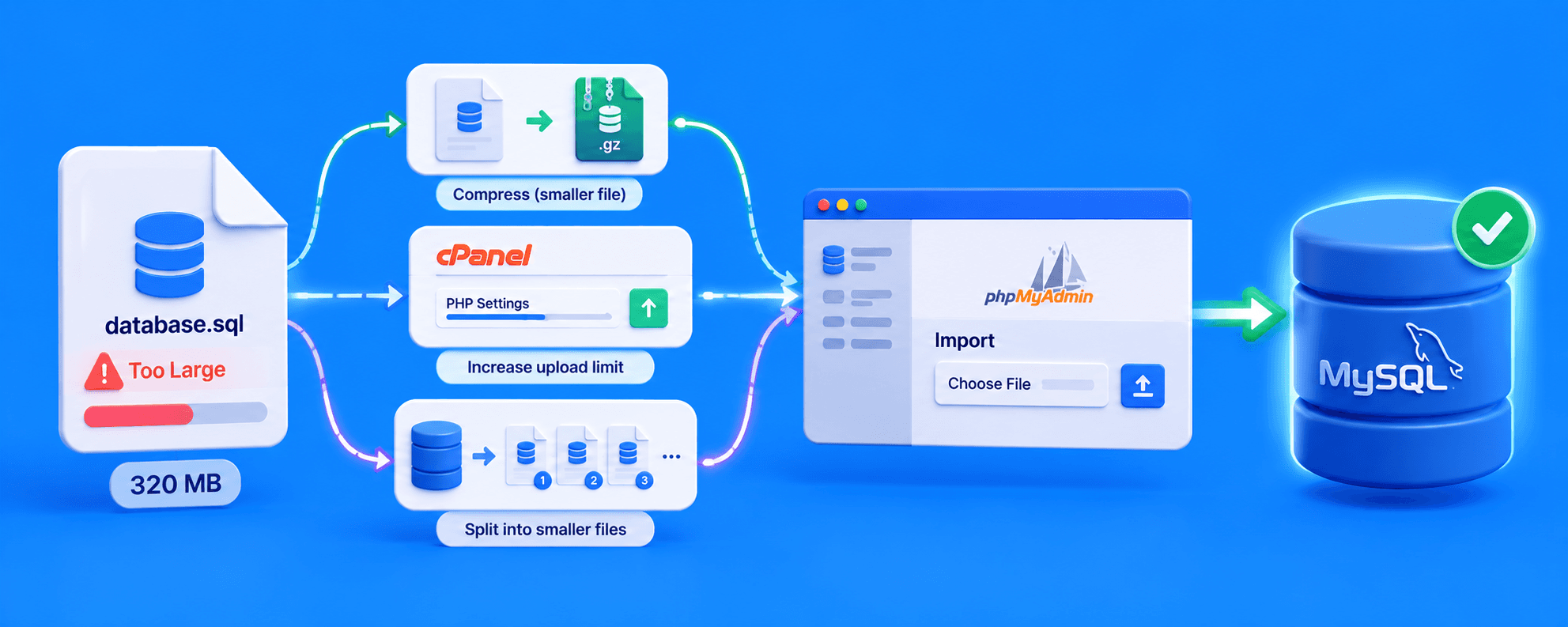
The "MySQL File Size Limit Exceeded" error occurs when your .sql backup file is larger than the upload limit configured in phpMyAdmin. To fix this without SSH access, compress the .sql file into a .zip or .gzip archive before uploading, increase the upload_max_filesize in phpMyAdmin, or use a staggered import tool like BigDump that bypasses the browser upload limit entirely, all through standard shared hosting tools alone.
Why phpMyAdmin Throttles Large Imports
phpMyAdmin's upload limit is inherited directly from your server's PHP configuration, specifically upload_max_filesize and post_max_size. On shared hosting, these defaults stay conservative (often 2MB to 165MB) to protect server resources from a single oversized upload. A 100MB database dump simply exceeds what the server was configured to accept through a browser form.
Why It Matters: Restoring Databases Without Timeouts
For an e-commerce store or high-traffic site, a database restore isn't optional maintenance, it's often the only path back online after a migration or disaster recovery scenario. Getting stuck on a file size error mid-restore means extended downtime while you find a workaround, exactly when speed matters most.
Solution 1: File Compression
Compress your .sql file into .zip or .gzip before uploading. phpMyAdmin accepts and automatically decompresses both formats natively during import, no extra software needed beyond a standard zip utility.
Text-heavy SQL dumps compress extremely well, often shrinking 70-80%, since repetitive SQL syntax compresses efficiently. A 100MB file frequently drops to 20-30MB, comfortably under most default limits.
Solution 2: Increasing PHP Limits
If compression alone doesn't get you under the limit, raise the ceiling directly.
In cPanel:
- Go to Software → MultiPHP INI Editor
- Select your domain
- Increase upload_max_filesize and post_max_size together (the second must be equal to or larger than the first)
- Also raise max_execution_time to give the import more time to complete before timing out
- Save and retry the import
Solution 3: Importing Very Large Files Without SSH Access
Most shared hosting plans, including NameSilo's, don't provide SSH or command-line access. That rules out the direct mysql import method many tutorials assume you can use. For files that remain too large even after compression and PHP limit adjustments, often multi-hundred-MB or larger, a staggered import tool solves this without needing a terminal at all.
BigDump is a widely used free PHP script built for exactly this no-SSH scenario, working entirely through File Manager and phpMyAdmin, the tools every shared hosting account already includes:
- Download BigDump and configure it with your database name, username, and password
- Upload bigdump.php and your .sql (or .gz) file to a directory on your site via File Manager
- Browse to the script's URL in your browser and start the import
- The script automatically imports in small batches, restarting itself between chunks to stay under PHP's memory and execution limits
- Once complete, delete bigdump.php and the dump file from your server immediately for security
This method handles multi-gigabyte databases reliably using only File Manager and phpMyAdmin, the tools available on standard shared hosting.
What This Means for You
NameSilo Hosting includes full cPanel, File Manager, and phpMyAdmin access, everything needed for compression, PHP limit adjustments, and staggered imports like BigDump, all without needing command-line access. Starting a new project after a migration? Register a new domain to go with it.
Frequently Asked Questions
What is the upload limit in phpMyAdmin?
It's inherited from PHP's upload_max_filesize, often 2MB to 165MB by default.
How do I import a large SQL file in phpMyAdmin?
Compress it first, then raise PHP limits via MultiPHP INI Editor if still too large.
Can I import a zipped SQL file into phpMyAdmin?
Yes. phpMyAdmin natively supports .zip and .gzip compressed imports.
How do I increase the phpMyAdmin import size in cPanel?
Software → MultiPHP INI Editor → raise upload_max_filesize and post_max_size.
How long does a BigDump import take for a large database?
Varies by size, but it runs unattended in the background as batches complete.
Why does my database import keep timing out?
The file is too large for the browser upload window; use a staggered tool instead.
How do I import a large SQL file without SSH access?
Use BigDump; it stages the import through File Manager and phpMyAdmin with no terminal needed.
What is BigDump?
A free PHP script that imports large SQL files in small automated chunks without SSH.
Does NameSilo hosting allow SSH for database imports?
No. NameSilo shared hosting doesn't offer SSH; use BigDump instead for large imports.
.png&w=2048&q=75)
NameSilo StaffThe NameSilo staff of writers worked together on this post. It was a combination of efforts from our passionate writers that produce content to educate and provide insights for all our readers.
More articleswritten by NameSilo
.png&w=3840&q=75)
.png&w=3840&q=75)
.png&w=3840&q=75)