


Support Guides2 min
Mastering DNS: Bulk DNS Record Management with Templates
NS
NameSilo Staff4/16/2024
Share
Efficiently managing DNS records for multiple domains can be a daunting task. However, with the right tools and knowledge, this process can be streamlined. In this guide, we’ll explore how to add DNS records to multiple domains in bulk using templates on NameSilo.
Step 1: Login to Your NameSilo Account
- Begin the process by logging in to your NameSilo account using your provided username and password.
.png&w=640&q=75)
Step 2: Access Domain Manager
- Locate and open the Domain Manager from the sidebar on the left.
.png&w=640&q=75)
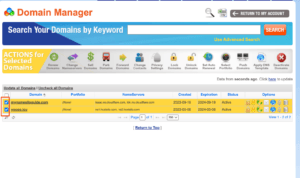
Step 3: Select Domains
- In the Domain Manager, select the domains for which you want to apply a template by using the checkboxes on the left. This allows you to make bulk changes across multiple domains simultaneously.
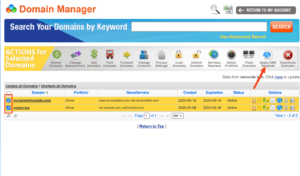
Step 4: Apply DNS Template
- From the action panel, click on ‘Apply DNS Template.’ This action initiates the process of applying a template to the selected domains.
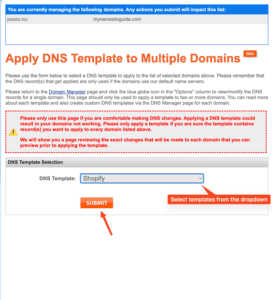
Step 5: Choose Template and Submit Changes
- On the template selection page, choose the desired template from the available options. If you haven’t created a custom template yet, refer to our previous article on creating DNS templates for a step-by-step guide.
- Click ‘Submit’ to apply the template changes to the selected domains. This step confirms and finalizes the bulk update process.
Step 6: Propagation Time
- Exercise patience for approximately 15-20 minutes to allow the DNS records to propagate across the internet. For more information on propagation, refer to our previous article on this crucial aspect of DNS management.
By utilizing templates on NameSilo, you can streamline and accelerate the process, guaranteeing consistency and precision across your portfolio of domains. This guide provides you with the steps to effortlessly implement bulk changes, elevating your overall DNS management experience.
.png&w=2048&q=75)
NameSilo StaffThe NameSilo staff of writers worked together on this post. It was a combination of efforts from our passionate writers that produce content to educate and provide insights for all our readers.
More articleswritten by NameSilo


