How to Fix the clientHold Domain Status Code
The clientHold status code means your domain registrar has suspended your domain from resolving on the internet. This is typically caused by failing to complete mandatory ICANN contact email verification or abuse flags. To fix it, check your email for registrar compliance notifications and contact NameSilo support with the appropriate channel.
What Is a clientHold EPP Status Code?
Domain names communicate their operational state through EPP (Extensible Provisioning Protocol) status codes visible in WHOIS records. Most healthy domains show clientTransferProhibited as their only status.
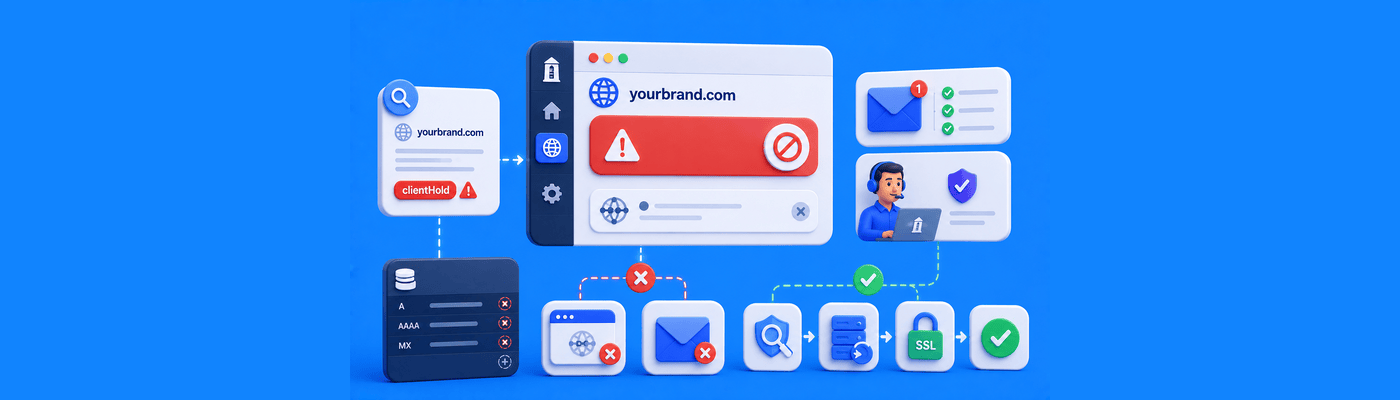
clientHold is a suspension code. When active, the registry removes your domain from its zone file. DNS queries return no results. Your website goes offline and incoming email stops, globally and instantly.
EPP Code | Meaning |
clientTransferProhibited | Normal lock, prevents unauthorized transfer |
clientHold | Registrar-placed suspension, domain not resolving |
serverHold | Registry-placed suspension, more serious |
clientHold is set by your registrar, not the registry. This is good news: your registrar can lift it once the underlying issue is resolved.
Why It Matters: Full Service Blackout
clientHold creates a complete communication blackout:
- Website returns NXDOMAIN or no response
- All email to your domain bounces
- Subdomains stop resolving
- SSL certificates may trigger errors
Every hour compounds. Customers cannot reach you. Emails go undelivered without senders knowing. Identify and resolve the cause as fast as possible.
Root Cause 1: Missing ICANN Verification
When you register a domain or update your registrant email, ICANN requires verification within 15 days. If you miss this, the registrar is required to place your domain on clientHold.
This is the most common cause and the fastest to fix.
Check your spam folder immediately for an email containing "ICANN" or "registrant verification" in the subject line. Click the verification link. If it has expired, you have two options to get a fresh link:
- Self-service: Log into NameSilo, go to Contact Manager, click the Verification tab, and click the envelope icon next to your contact to resend the verification email.
- Live chat: Contact NameSilo support via live chat and they can trigger the resend for you.
The clientHold lifts quickly after verification completes.
Root Cause 2: Abuse Complaints
If your domain was reported for spam, phishing, or malware distribution, NameSilo's specialized abuse team places a clientHold pending investigation.
Abuse-related clientHolds cannot be resolved via live chat. Email [email protected] with your domain name and account details. The abuse team reviews cases individually and will contact you with findings. Do not attempt to transfer the domain during a clientHold; transfers will be rejected.
Implementation Steps: Resolve a clientHold
Step 1: Run a WHOIS lookup at namesilo.com/whois to confirm clientHold is the active status.
Step 2: Check your registrant email inbox and spam folder for ICANN verification or compliance notification emails.
Step 3: Log into your NameSilo account and check for any compliance notifications or incomplete profile information.
Step 4: Verification-related hold, contact NameSilo via live chat from your dashboard.
Step 5: Abuse-related hold, email [email protected] with your domain name and a brief explanation.
Step 6: After the hold is lifted, confirm resolution has been restored using namesilo.com/whois.
Common Mistakes
Waiting to act: Every day of clientHold is a day of lost traffic, lost email, and lost trust.
Contacting live chat for abuse cases: Abuse reviews require the specialized team at [email protected]. Live chat cannot escalate or resolve abuse-triggered holds.
Ignoring the verification email: Many users filter automated emails to spam. Check thoroughly. This single email is the fastest resolution path for the most common clientHold trigger.
What This Means for You
Check your domain status anytime at namesilo.com/whois. A healthy domain shows no hold codes. If clientHold appears, act the same day. The cause is almost always fixable within hours once identified.
Frequently Asked Questions
What does clientHold mean?
Your registrar suspended your domain from DNS resolution.
Why is my domain suspended with clientHold?
Missing ICANN verification or an abuse complaint against the domain.
How do I remove clientHold status?
Identify the cause, resolve it, then contact NameSilo support.
Does clientHold mean someone stole my domain?
No. It is a registrar-placed suspension, not a theft or transfer.
How do I complete ICANN domain verification?
Click the link in your verification email, or request a resend via live chat.
Will my website recover its SEO after clientHold is lifted?
Yes. DNS restoration is rapid; full crawl recovery takes days to weeks.
How long does it take to lift a registrar suspension?
Verification holds lift quickly. Abuse reviews take longer depending on case complexity.
Where do I check my domain status codes?
namesilo.com/whois shows all active EPP status codes.
NameSilo Staff
The NameSilo staff of writers worked together on this post. It was a combination of efforts from our passionate writers that produce content to educate and provide insights for all our readers.