

DNS4 min
What is a DKIM Selector and How Do You Find It?
NS
NameSilo Staff8/19/2026
Share
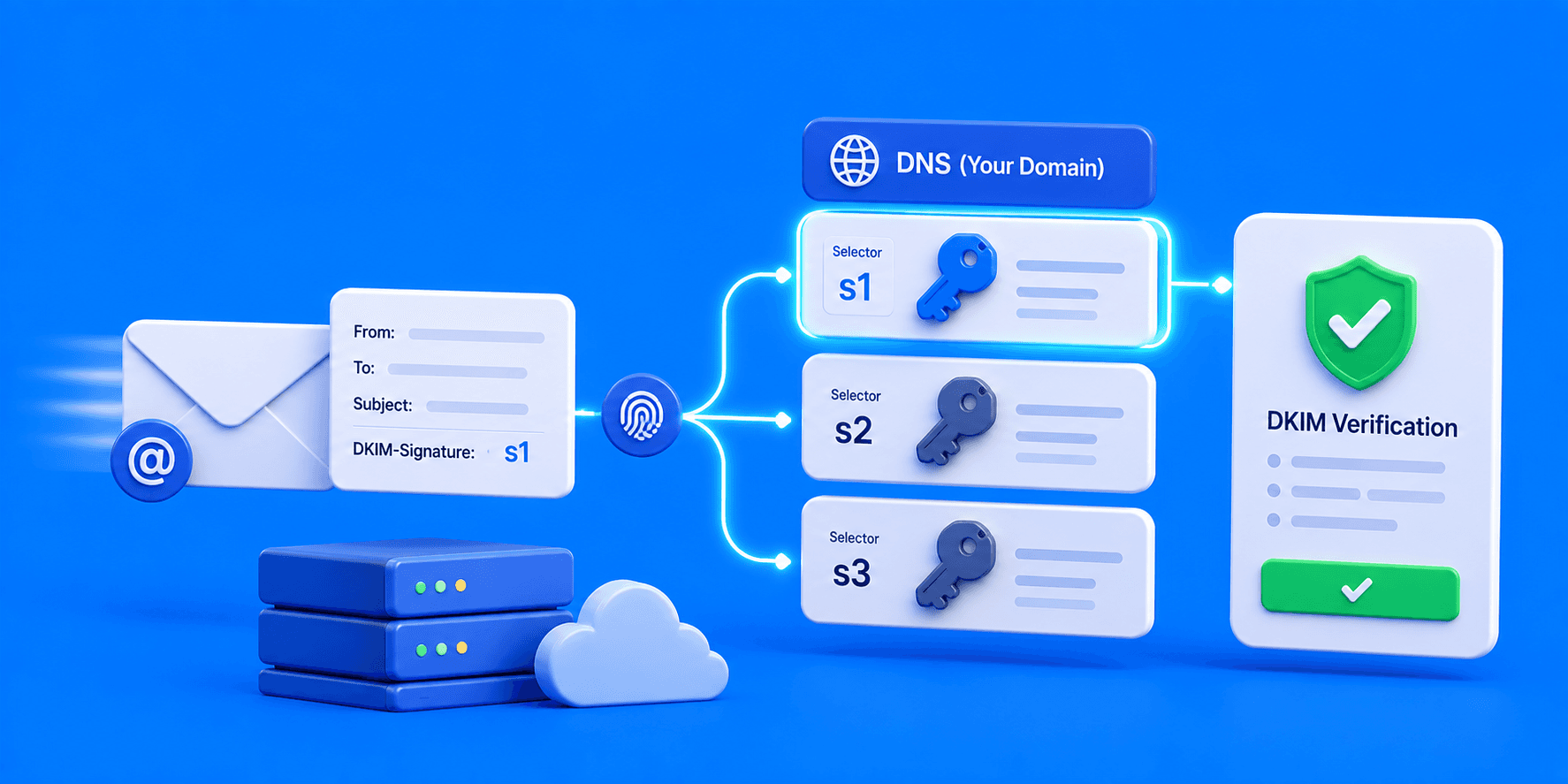
A DKIM selector is a unique string of text used to identify a specific public key in your domain's DNS. Because a domain can send emails from multiple services (like Google Workspace and Titan Mail), the selector tells receiving servers exactly which DKIM key to check. You can find your selector in your email provider's authentication settings or by inspecting a raw email header.
How the Selector Fits Into DNS Syntax
DKIM records don't live at your root domain. They live at a specific, selector-prefixed subdomain:
selector._domainkey.yourdomain.com
If your selector is google, the record lives at google._domainkey.yourdomain.com. Titan Mail uses titan1 by default, publishing at titan1._domainkey.yourdomain.com, entirely separate from Google's. If a Titan key is ever regenerated, the new selector typically increments, titan2, titan3, and so on.
Both can coexist peacefully because each has its own unique selector prefix. Without selectors, a domain sending from multiple services would have no way to publish more than one DKIM key at once.
Why It Matters: Multiple Services, One Domain
Modern businesses rarely send email from just one platform. Google Workspace handles daily correspondence, a marketing platform sends newsletters, and a CRM sends transactional receipts, all under the same domain.
Each service signs its outgoing mail with its own private key and publishes its own public key under its own selector. Receiving servers read the s= tag in the DKIM-Signature header, look up that selector's DNS record, and verify the signature against it. This lets several unrelated services authenticate independently under one domain without conflict.
Method 1: Check Your Email Provider's Admin Console
Google Workspace: Admin Console → Apps → Google Workspace → Gmail → Authenticate Email → select domain. The selector shown here defaults to google unless customized during key generation.
Titan Mail (via NameSilo): NameSilo Email Manager → Titan tab → Manage Account→ Email Reputation page. Your active selector and record details are listed here.
Most providers show the selector directly on the same screen where you generate or manage the DKIM key.
Method 2: Inspect the Raw Email Header (Most Reliable)
When the admin console isn't accessible, or you're auditing a domain you don't directly manage, reverse-engineer it from an actual sent email.
- Send a test email to an account where you can view full headers (Gmail-to-Gmail sometimes trims headers, so use a different provider if possible)
- Open the message and find the option to view the original or raw source
- Locate the line starting with DKIM-Signature:
- Find the s= tag inside that line, this is your selector
DKIM-Signature: v=1; a=rsa-sha256; c=relaxed/relaxed; d=yourdomain.com; s=google; ...
In this example, s=google confirms the selector. You can now look up google._domainkey.yourdomain.com directly to inspect the published key.
Common Mistakes
Assuming every provider uses default as the selector: Selectors vary widely. Google defaults to google, Titan Mail defaults to titan1, and other platforms generate random strings entirely. Guessing wrong makes diagnostic tools report DKIM as broken when it's actually configured correctly under a different selector.
Only checking one email service: A domain with three sending platforms has three separate selectors and three separate DNS records. Auditing only one gives an incomplete picture of your authentication setup.
Copying the DKIM value with hidden characters: A trailing space or line break copied into the TXT record value causes authentication to fail even though the selector and record placement are correct.
What This Means for You
Once you know your selector, add or verify the DKIM TXT record through NameSilo's DNS Manager: Domain Manager → blue globe icon → Add New DNS Record → TXT, with the host set to selector._domainkey. Explore NameSilo Email options or search available names if you're setting up authentication for a new domain.
Frequently Asked Questions
What does a DKIM selector look like?
A short string like google, titan1, or a custom name chosen at key generation.
How do I find my DKIM selector?
Check your provider's admin console, or find the s= tag in an email header.
What is a _domainkey?
The fixed DNS subdomain segment where all DKIM records are published.
Can I have multiple DKIM selectors?
Yes. Each sending service typically uses its own unique selector.
What is the Google Workspace DKIM selector?
google by default, though it can be customized during setup.
How do I test my DKIM record?
Use MXToolbox or a similar checker with your domain and selector.
What does s= mean in an email header?
It identifies the selector used to sign that specific message.
How do I save a DKIM TXT record at NameSilo?
DNS Manager, add a TXT record, host selector._domainkey, paste the value.
.png&w=2048&q=75)
NameSilo StaffThe NameSilo staff of writers worked together on this post. It was a combination of efforts from our passionate writers that produce content to educate and provide insights for all our readers.
More articleswritten by NameSilo
.png&w=3840&q=75)
.png&w=3840&q=75)
.png&w=3840&q=75)