Your next big idea starts with a name. Find yours
All articles
KEEP YOUR IDEAS GROWING

NameSilo Staff

A little insight goes a long way. Find your next good read.

1,710 articles

Narrow your search

Keep typing, then choose where to search. Articles can match any checked field.

Search in
Sort by
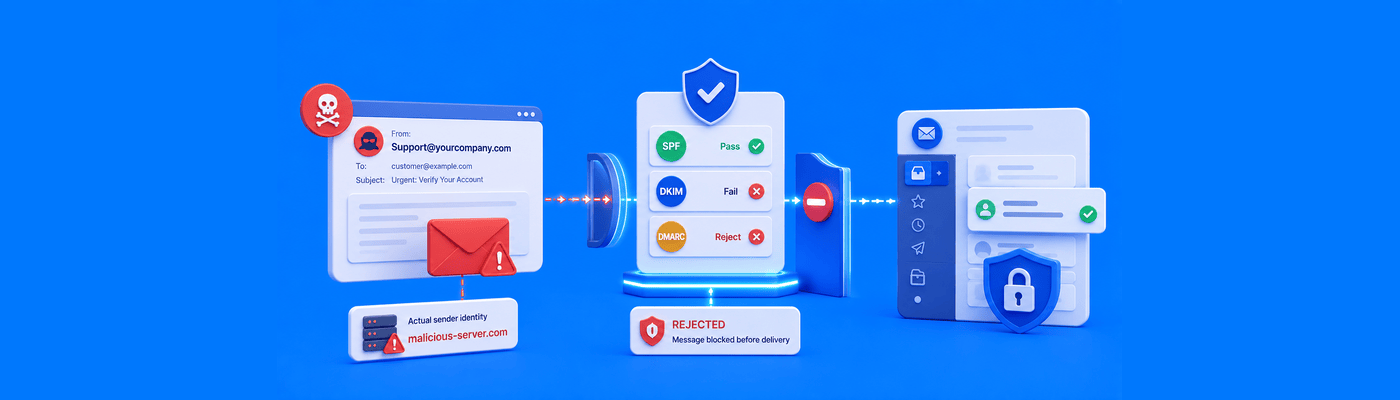
Illustration of SPF, DKIM, and DMARC authentication detecting and blocking a spoofed email before it reaches the recipient's inbox.
Privacy & Security

What is Email Spoofing and How Do You Stop It?

Email spoofing forges the visible "From" letterhead while SPF only checks the hidden envelope address, which is why SPF alone can't stop it. DMARC at p=reject closes this gap by requiring alignment between the two. BEC caused $3.05 billion in losses in 2025 per FBI IC3. Catch-all addresses increase spoofing-related risk.


Illustration of increasing the PHP maximum file upload size using cPanel MultiPHP INI Editor to allow larger website and WordPress uploads.
Websites & Hosting

How to Change Your Maximum File Upload Size (php.ini)

Increase WordPress upload limits via cPanel's MultiPHP INI Editor: raise upload_max_filesize, then post_max_size to an equal or greater value, then memory_limit to match. Skipping post_max_size is the most common cause of silent upload failures and the "link you followed has expired" error.

Illustration of NameSilo Domain Defender blocking unauthorized domain transfers and account changes with an additional security verification layer.
Privacy & Security

Understanding NameSilo Domain Defender

NameSilo Domain Defender is a free security layer requiring up to 5 custom security questions before any domain-level change executes. Unlike 2FA, which secures login, Domain Defender secures the actions that happen after login, including transfers, unlocking, and WHOIS edits. Pair both for maximum protection.

Illustration of the NameSilo API automating domain registrations and DNS management with secure API authentication and IP whitelisting.
Domain Name Search

Automating Domain Registrations with the NameSilo API

Automate domain registration and DNS management via NameSilo's API using simple GET requests. Secure your integration with IP whitelisting (up to 5 IPs) in API Manager, and never expose your key in public repositories or client-side code. Full reference and sandbox testing available.

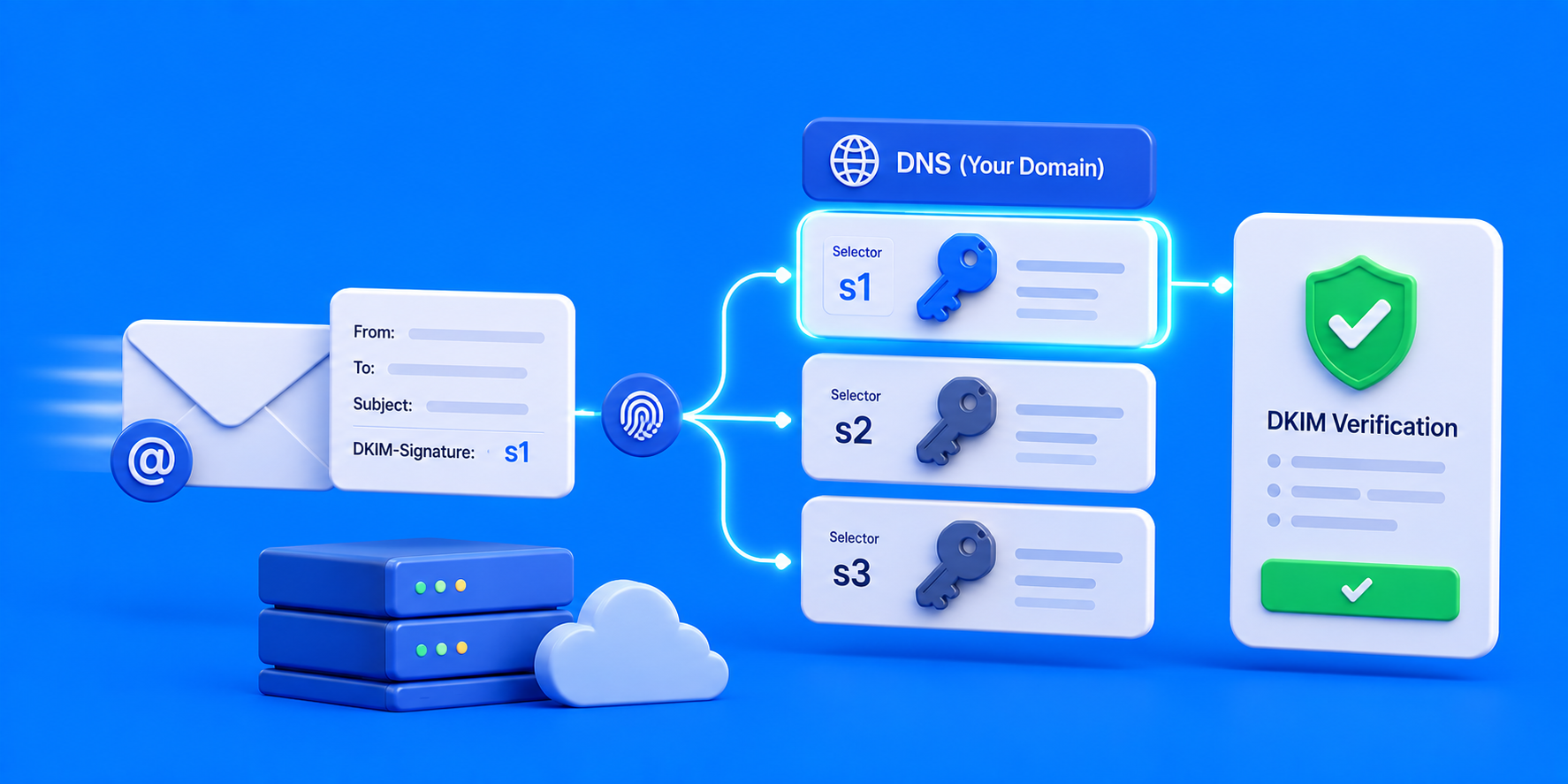
Illustration of a DKIM selector identifying the correct public key in DNS to authenticate an outgoing email.
DNS

What is a DKIM Selector and How Do You Find It?

A DKIM selector identifies which public key to check in DNS, following the format selector._domainkey.yourdomain.com. Find it in your provider's admin console (Google Workspace defaults to "google"; Titan Mail shows it under Email Reputation) or by inspecting the s= tag in a raw email header.

Illustration of generating an SSL Certificate Signing Request in cPanel, with the CSR sent to a Certificate Authority while the matching private key remains secured on the web server.
Websites & Hosting

How to Generate a CSR (Certificate Signing Request)

Generate a CSR in cPanel: Security → SSL/TLS → Private Keys (2048-bit) → Certificate Signing Requests → fill in domain, company, and location fields. Copy the full BEGIN/END CERTIFICATE REQUEST block. Back up the private key immediately; losing it makes the issued certificate unusable.

Illustration of two-factor authentication protecting a domain portfolio with a time-based authenticator code and security shield blocking unauthorized access.
Privacy & Security

Securing Your Domain Portfolio with Two-Factor Authentication

Enable app-based TOTP 2FA to protect your domain portfolio; never use SMS, which is vulnerable to SIM-swapping, the primary method used in high-value domain theft. NameSilo offers free, app-only 2FA and recommends Authy for its secure backup. Pair with Domain Defender for domain-level change protection.

Illustration of cPanel IP Blocker stopping a malicious IP address from reaching a website while allowing legitimate visitor traffic through.
Websites & Hosting

How to Block Malicious IP Addresses Using cPanel

Block malicious IPs via cPanel Security → IP Blocker, which writes Deny rules directly into .htaccess. Accepts single IPs, ranges, and CIDR blocks. Applies globally across all domains on the account. Always verify your own IP first to avoid locking yourself out.

Illustration of WHOIS domain contact roles showing the Registrant as the domain owner with Administrative, Technical, and Billing contacts handling delegated responsibilities.
Privacy & Security

Registrant, Admin, and Tech Contacts in WHOIS Explained

WHOIS contact roles: Registrant (legal owner), Administrative (business decisions), Technical (DNS/webmaster), and Billing. Agencies should only ever hold Admin or Tech, never Registrant, to avoid legal liability and protect client ownership. NameSilo opts customers out of the standard 60-day registrant-change lock by default.

Illustration showing how fake WHOIS information can lead to domain suspension and clientHold status, taking a website and email offline, contrasted with accurate registrant details protected by WHOIS privacy.
Privacy & Security

What Happens If Your WHOIS Data is Fake?

Fake WHOIS data violates ICANN's Accuracy Program Specification and can trigger clientHold, taking your site and email offline. Registrant emails must be verified within 15 days. Skip the risk entirely with free WHOIS privacy, which protects your details without falsifying them.

Illustration comparing ALIAS and CNAME DNS records, showing a CNAME connecting a www subdomain to a cloud service and an ALIAS-style record connecting the root domain without conflicting with MX, NS, or email records.
DNS

ALIAS Records vs. CNAME Records: Which Do You Need?

RFC 1035 forbids CNAME records at a root domain because they conflict with MX and NS records. ALIAS, ANAME, and CNAME flattening are vendor-specific workarounds, not a DNS standard. NameSilo doesn't currently offer ALIAS/ANAME; use CNAME on www plus root forwarding, or delegate DNS to a provider like Cloudflare that supports it.

Illustration of warming up a new domain for cold email outreach by gradually increasing email volume, using SPF, DKIM, and DMARC authentication, building sender reputation, improving inbox deliverability, and keeping outreach separate from the primary business domain.
Email

How to Warm Up a New Domain for Cold Email Outreach

Warm up a new cold email domain over 4-8 weeks: start at 5-10 emails/day, scale to 40-50+ by week 6-8. Never send cold outreach from your primary corporate domain. Configure SPF, DKIM, and DMARC before day one. Favor vetted warmup tools over open shared engagement pools.

FROM IDEA TO REALITY

You’ve got the idea.
Give it a name.

Find a domain that feels like you. Build what comes next.