How to Recover a Hacked WordPress Website
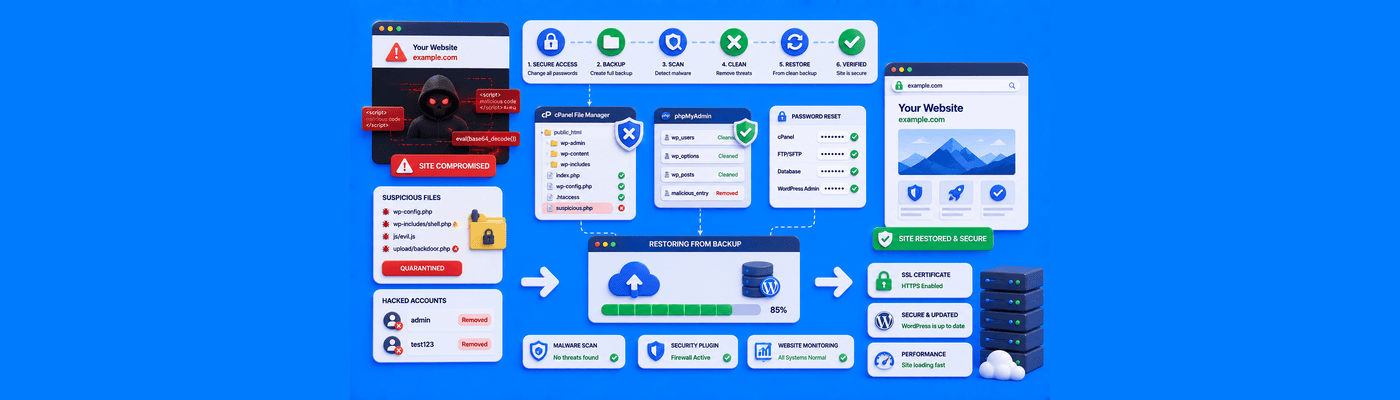
To recover a hacked WordPress website, immediately put the site in maintenance mode to protect visitors. Change all cPanel, database, and FTP passwords. If possible, restore your website from a clean, pre-hack backup. If no backup exists, you must manually reinstall the WordPress core files, delete malicious plugins, and scan the database for injected scripts.
Triage: Identify the Type of Hack
Not all compromises look the same. Identifying the type helps you move faster.
Symptom | Likely Issue |
Defaced homepage, visible message | Direct file tampering |
Site loads fine, but Google shows a warning | Hidden SEO spam injected in database |
Visitors redirected to unrelated sites | Malicious .htaccess or phishing redirect script |
Unknown admin users in your dashboard | Backdoor account already created |
If symptoms vary by device or visitor, assume a breach even if your own browser looks fine; hackers often cloak the infection from logged-in admins.
Step 1: Quarantine and Password Resets
Change credentials in this specific order to avoid getting locked out mid-process:
- Hosting control panel (cPanel) password
- FTP/SFTP password
- Database password (then update wp-config.php to match)
- All WordPress administrator accounts
Also regenerate your WordPress security salts (Authentication Unique Keys and Salts) using the official WordPress salt generator, and paste the new block into wp-config.php. This instantly logs out every session and invalidates stolen login cookies.
Step 2: The Clean Backup Restore
If you have a backup dated before the hack, restore it. This is the fastest and most reliable fix: a clean restore wipes every malicious file and database change in a single step.
Scan the backup itself before trusting it. If the infection existed for a while before you noticed, your "clean" backup may already contain it. Run a malware scanner against the restored files before reconnecting the site to live traffic.
After restoring, immediately update WordPress core, plugins, and themes before the same vulnerability gets exploited again.
Step 3: Manual Core Reinstallation (No Backup Available)
Download a fresh copy of WordPress from wordpress.org and replace wp-admin/ and wp-includes/ entirely. Do not replace wp-config.php or wp-content/; those need individual inspection instead.
Check these locations for injected code:
- wp-content/uploads/ for any .php file. This folder should never contain executable PHP; its presence is a near-certain backdoor.
- wp-content/themes/your-theme/functions.php for eval(), base64_decode(), or assert() calls
- Common backdoor filenames: shell.php, c99.php, r57.php, or random numeric names
- wp_posts and wp_options tables via phpMyAdmin, searching for <iframe> or eval( strings
Set file permissions to 755 for directories, 644 for files, 600 for wp-config.php.
Common Mistakes
Deleting spam content but missing the backdoor: Removing visible defacement or spam posts feels like progress, but if the hidden PHP backdoor in wp-content survives, the attacker regains access within days. Backdoors are the number one reason for repeat hacks. Scan every folder, not just the obviously affected ones.
Restoring an already-infected backup: Skipping the pre-restore scan can reintroduce the exact malware you're removing.
Rushing back online before hardening: Cleaning the infection without fixing the vulnerability that let the attacker in invites an immediate repeat.
What This Means for You
NameSilo Hosting gives you full cPanel access, including File Manager and phpMyAdmin, everything needed to manually inspect and clean an infected site. To make future recovery faster, consider a backup plugin such as UpdraftPlus, BlogVault, or Duplicator, and schedule regular exports so a clean restore point is always available if you're hacked again. Need a fresh domain for a rebuild? Search available names.
Frequently Asked Questions
How do I know if my WordPress site is hacked?
Redirects, unknown admin users, Google warnings, or unexpected files in uploads.
How do I clean a hacked WordPress site?
Restore a clean backup, or manually replace core files and scan the database.
Can a hacked website be saved?
Yes. Nearly every WordPress hack is recoverable with thorough cleanup.
Why does my WordPress site redirect to spam?
A malicious script in .htaccess or the database is hijacking visitor traffic.
How do I find malware in WordPress?
Use Wordfence or Sucuri, then manually inspect uploads and theme files.
What is a WordPress backdoor?
Hidden code letting an attacker regain access even after passwords change.
NameSilo Staff
The NameSilo staff of writers worked together on this post. It was a combination of efforts from our passionate writers that produce content to educate and provide insights for all our readers.