The ERR_NAME_NOT_RESOLVED error occurs when your browser cannot find the IP address associated with your domain name. To fix this, verify that your domain's A Record points to the correct hosting IP, ensure your nameservers are configured properly, flush your computer's local DNS cache, and check that your domain has not expired or been suspended.
What Does ERR_NAME_NOT_RESOLVED Mean?
This error indicates a DNS routing failure. Your browser asked "What IP address is example.com?" and received no valid answer.
DNS (Domain Name System) translates human-readable domain names into IP addresses computers use to connect. When this translation fails, your browser displays ERR_NAME_NOT_RESOLVED instead of loading the website.
The problem exists somewhere in the chain: your DNS records, your domain status, propagation timing, or local caching. Work through the causes below from most likely to least likely.
Root Cause 1: Missing or Incorrect DNS Records
Most common cause. Your domain's A record may be missing, pointing to the wrong IP, or contain a typo.
- Verify your nameservers are listed correctly
- Use a DNS checker to confirm your A record resolves to your hosting IP
- A record points to old/decommissioned server
- A record was never created after registration
- Nameservers point to a provider with no zone configured
Fix: Verify the A record matches your hosting provider's IP exactly.
Root Cause 2: Domain Status Issues
Your domain may be expired, suspended, or pending verification.
Check WHOIS for status codes:
| | |
| | Verify email, contact registrar |
| | Renew immediately (fees apply) |
| | |
| | |
Fix: Address the underlying status. For clientHold, check email for verification links. For expiration, renew before redemption fees apply.
Root Cause 3: Local DNS Caching
Your computer or router may be caching old DNS data, showing errors even after you've fixed the records.
sudo dscacheutil -flushcache; sudo killall -HUP mDNSResponder
- Clear browser cache or test in incognito mode
- Restart your router (it caches DNS too)
- Try a different DNS resolver (8.8.8.8 or 1.1.1.1)
If the site loads on your phone (mobile data) but not your computer, local caching is almost certainly the cause.
Common Mistakes
Assuming global outage: The site may resolve fine elsewhere while your local cache holds stale data. Test from multiple devices and networks before panicking.
Not waiting for propagation: DNS changes take 1-24 hours to propagate globally. New records may not resolve immediately.
Checking too soon after changes: If you just updated DNS, wait at least an hour before troubleshooting further.
Ignoring nameserver configuration: A records only work if nameservers are pointing to the correct DNS provider first.
What This Means for You
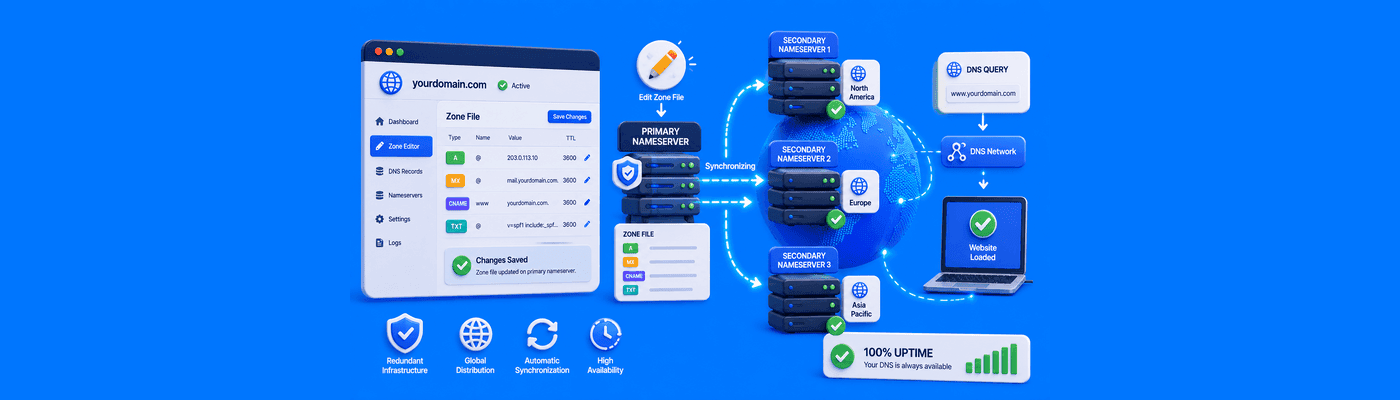
NameSilo's DNS Manager lets you verify and update records quickly. Check that your nameservers are NS1.DNSOWL.COM, NS2.DNSOWL.COM and NS3.DNSOWL.COM (if using NameSilo DNS), then confirm your A record in the DNS console. Frequently Asked Questions
What causes ERR_NAME_NOT_RESOLVED?
Missing DNS records, expired domains, or stale local cache.
How do I fix a DNS resolution error?
Verify A records, check domain status, flush DNS cache.
Does clearing my browser cache fix DNS errors?
Sometimes. Browser and DNS caches are separate—flush both.
How do I flush my DNS cache?
Windows: ipconfig /flushdns. Mac: sudo dscacheutil -flushcache.
Why does my site load on the phone but not the computer?
Your computer is caching old DNS. Flush cache or restart router.
How long does it take for DNS to resolve?
1-24 hours depending on TTL settings.
Can an expired domain cause a name resolution error?
Yes. Expired domains lose DNS resolution.
How do I check my nameservers?
Run a WHOIS lookup on your domain.

.png&w=2048&q=75)


.png&w=3840&q=75)
.png&w=3840&q=75)